Latest Updates-> SPB Mobile Shell v.3.5.5 New Release!here          New version Inesoftphone v5.07 English Click here          New SPB Mobile Shell Change SKIN v.4.5 Click here          New Documents To Go v3.0 Click here          HTC Espresso Theme For Mobile Shell here          Spb Mobile Shell v3.5.5 build 10087 latesthere
Showing posts with label alarm. Show all posts

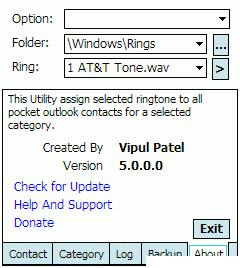
VipPimRingTone v9.0 ppc

[PPC]VipPimRingTone v9.0
Requirements:PPC WM5 WM6

An Application to assign ringtone based on Category

Changelog:
Version 9.0 ( Current)
- Quick fix for bug posted in this forum

Version 8.9.0.0
- Quick fix for MS Active sync error
- New Fix folder selection which can support ringtone in any folder. Even it Should work in non-enlish rom's

Version 8.1.0.0
- Quick fix for MS Active sync error
- Fix folder selection

How to remove Ring tone assigned to Contacts

1.Start VipPIMRingtone
2.go to category tab (wait till all category populated)
3.Select All Categories
4.Select Remove/null/NoRingtone Option on Ring list
5.Select proper OpTion
6.and then click Assign Button


Download to PC Clickshere
Alternatehere

RockClock v1.5.0.3 ppc

[PPC]RockClock v1.5.0.3
Requirements: WM6, 6.1 , 6.5 - NET CF 3.5

RockClock is a simple FREE Alarm Clock


Main Features:
- 4 Alarms, which will wake the device from a standby state
- Alarm Sound selection
- Adjustable Snooze timer
- Toggle UI elements
- Countdown Timer
- Stopwatch with laptimer
- Vibration option
- Clock colour selection
- Finger friendly UI

Changelog:
- Vibration option enabled
- Countdown Timer included
- Stopwatch included
- Quicker rotation when using programs like 'changescreen' etc
- Re-worked settings page
- BUGFIXES and REWRITES completed and working
- Packaging problem fixed (....so it seems but need more people to let me know if it works!)


Download to PC Clickshere
Alternatehere

phoneAlarm Pro v3.02 Final Build 448 ppc

[PPC]phoneAlarm Pro v3.02 Final Build 448
Requirements: Windows Mobile 5/6 All resolutions

phoneAlarm is a Today Screen plugin providing repeating alarms when Email/SMS, missed calls, or voice mail is waiting or when the phone signal or battery is too weak.


Here are some key features of "phoneAlarm":
· Provides repeating alarms and escalating sound on new SMS/Email, missed calls & voice messages
· 7 Custom Phone profiles with manual / time-based automatic switching.
· Alarm notification on weak phone signal or battery
· Customise sound, volume and repeat for each alarm type in each profile
· Mute device and phone volume, also 1-click mute button
· Skinable user interface
· Bluetooth, WLAN & Flight mode control via profiles (also for Widcomm/Broadcomm stack)
· Auto-profile change on (Work) and (Car)
· Detailed GPRS volume tracking
· Billing calculation - keep track of your phone costs
· Location-based information (change profile dependent on current location!)
· Call and SMS forwarding support in each profile
· 1-hand dialer for last 10 numbers (only for WM 5.0 & WM 2003 SE)
· Icons provide direct access to Inbox, missed call history etc.
· Option to cycle radio (off/on) to change user on dual SIM
· Rotate screen on profile change
· English, German, French, Italian, Danish, Dutch, Czech, Russian and Chinese user interface
· Supports VGA display
· Simple installation

v3.02 [Build 448] (15th September 2010)
paHost shutdown on some Samsung devices and HTC HD2 fixedJapanese, Polish and Danish translations updated (many thanks to Kiyoaki, Sebastian and Pierre)New: Screenlock unlock via light sensorVoice Command support improved and backlight issue fixedImproved installer to handle issues with paHost in hidden modeImprove host handling when screen is rotatedOption to mark Calender logged calls as privateFix Image_AppLink10 issue in skinsFix issue with Appointment switch based on time ignored based on time-zoneSkin drawing on 480x800 WVGA devices improved
paHost shutdown on some Samsung devices and HTC HD2 fixed
Japanese, Polish and Danish translations updated (many thanks to Kiyoaki, Sebastian and Pierre)
New: Screenlock unlock via light sensor
Voice Command support improved and backlight issue fixed
Improved installer to handle issues with paHost in hidden mode
Improve host handling when screen is rotated
Option to mark Calender logged calls as private
Fix Image_AppLink10 issue in skins
Fix issue with Appointment switch based on time ignored based on time-zone
Skin drawing on 480x800 WVGA devices improved


Download to PC Clickshere
Alternatehere

InboxTones v.1.02 ppc

[PPC] InboxTones v.1.02
Requirements: WM5-WM6.5 All resolutions


Add Email & SMS Ringtone Notifications for Contacts to your WM 5/6 Phone!

- Ringtone manager for Email & SMS Messages
- Assign Email & SMS ringtones to built in Contacts
- Assign ringtones to Sender Groups (mywork.com)
- No restrictions, overrides WM single sound file limit
- Use most MP3, WAV, WMA, MIDI sound files
- Different sound for each Email account
- Different sound for each Email / SMS Sender, Group
- Optional vibration for specific Senders in SP version
- For POP3, IMAP, Outlook, DirectPush, SMS accounts
- Selectable play duration for assigned sound
- Can also use sound files from storage card
- Know when Boss, Friend, Spouse, Email or Text You!
- Auto silences sound based on Vib / Silent / Mtg profile


Download to PC Clickshere
Alternatehere

CradleAlarm v4.7.5 windows phone 6.5

[PPC] CradleAlarm v4.7.5 windows phone 6.5
Requirements: Pocket PC with WM 5.0, 6.x All resolutions

CradleAlarm is the successor of enAlarmPPC, the popular MP3, WAV,... alarm clock.


The built-in alarm clock of Windows Mobile lacks in functionality and usability. This is where CradleAlarm comes in. With this program you can set multiple alarms in your device. Four different alarm types exist:

1. Compact alarm - This is a simple alarm which is also known from the previous versions called enAlarmPPC. Only some basic options can be set using this alarm. That is why this alarm is recommended for adding a simple alarm quickly. Using this type it is possible to add once-only and recurring alarms at selected weekdays. Because of the compact layout you probably need to use the styles to set the settings for this type.

2. Wizard alarm - This alarm type is a "normal" alarm, like the compact alarm, but features many more configuration options. The different settings are entered using a step-by-step wizard.

3. Appointment alarm - The settings for this alarm type are very similar to the settings of the wizard alarm. This alarm type, in addition to the alarm time, will also have an alarm date. The alarm starts at a specified time at a specified date and will be automatically deleted after the alarm has started.

4. Command alarm - This alarm runs at the specified time a stated program or opens a stated document.

Every single alarm can be configured independently. Every alarm (except the command alarms) has its own playlist of MP3, WAVE, Windows Media or Midi files. Furthermore the appearance of the alarm can be configured by selecting different colors or background images.

Compact and wizard alarms can be configured to start only once, daily or on different weekdays.

Particularly the snooze function of the build in alarm is extremely poor. The innovative snooze function of CradleAlarm helps late risers to get up on time. To activate the snooze during an alarm the user can tap on any spot of the screen. If the snooze function is used too often, a quiz starts. To activate the snooze again, the user has to solve some sort of task. This will avoid that the snooze will be unintentionally hit too often.

With every new task the challenge gets harder and the user has to think more. That way the brain needs to, at least for short, work actively and so the wake up process is initiated.

The current version of CradleAlarm offers three different types of quizzes:

* Math: During this quiz the user has to solve a simple math calculation before he can activate the snooze again. With every try the problem gets harder.
* Memory: Six pairs of "cards" are shown to the user upside down. He has to find the pairs by turning around two cards after another. During the first snooze try the user has to find one pair only (all other cards are already turned around). The next try he has to find two pairs, etc.
* Repeat: A sequence of numbers is shown to the user one after another. Afterwards he has to repeat the sequence in the same order. Until he repeats the sequence correctly the snooze will not start again. With every try to sequence he has to remember gets longer.

All snooze options can be set individually for every alarm.

Further it was considered that the sound files are faded in when played. That way the user will not affright if a loud starting sound is played.

This version now also features a today screen plugin. Thereby it is possible to look over all configured alarms, edit them, see when the next alarm will go off and start CradleAlarm directly from the device's main screen.

To not start all over again with all the preferred settings for every new alarm, all settings can be saved as a template. For the next alarm, just select the template, perhaps enter a new time and hit OK. Three nice looking templates are already installed with the program. You can even download and import more templates.

Changelog:
v4.7.5:
Bug fixes:
Fixed broken sound fading from last update.

v4.7.4:
Bug fixes:
Restores volume of Windows Media Player after alarm ends


Download to PC Clickshere


Alternatehere

AddinTimer 3.5.2 pocket pc

AddinTimer 3.5.2


AddinTimer is a Task Scheduler windows mobile. You will be free
from multifarious settings. AddinTimer includes all aspects of windows Mobile and it is a convenient, practical and indispensable tool.

Meanwhile, the timer's styles of AddinTimer
(Once, Weekly, Monthly, Daily, Yearly, Countdown and so on) can be jointly used, so as to
meet more complicated scene and requirement.

Features
Alarm Timer / Flight Timer / Bluetooth Timer
Wifi Timer / Call Timer / SMS Timer
Call forwarding Timer / Scene Timer / Theme Timer (TSK or Picture)
Reset Timer / Application Timer (Start or Kill) / SMS Backup Timer
Contacts Backup Timer / Files Backup Timer / Report Time hourly
Report Time immediately by pressing a key / Check UTC (Sync Time)
Stopwatch
Requirements
.NET Compact Framework 2.0

Download clickshere

Pocketmax phoneAlarm Pro v2.23 lastest build 378 Beta

Pocketmax phoneAlarm Pro v2.23 lastest build 378 Beta


Your complete, easy to use, communication center, never overlook
a missed call, voicemail, Email or SMS again. Plus 7 powerful Phone
profiles to control all your important settings


Supports WM 5.0, WM 6.0 and WM 6.1 Phone Edition (with touch-screen)
phoneAlarm is a Today screen plugin - giving you total control over your
Pocket PC Phone. Never miss an important call, SMS or Email again.
Automatically switch profiles and quickly access Inbox, call history and
control the state of bluetooth directly from the Today screen. Optimised for
one-handed and in-car use.
phoneAlarm Key Features
  • Provides repeating alarms on new SMS, Email, missed calls, voice messages & reminders
  • 10 Custom Phone profiles with manual and automatic switching.
  • Automatic profile change based on time, location, Appointment type/category, network and power/ActiveSync events
  • Custom Email / SMS alarms based on text, sender or priority
  • Alarm notification on weak battery and phone signal
  • Customise sound, volume and options for each alarm type in each profile
  • Automatically mute system and phone volume
  • Skinnable user interface (How to create skins)
  • Bluetooth and Flight mode control via profiles (also for Widcomm/Broadcomm stack)
  • 1-hand skin navigation and quick-dialer for last 10 numbers
  • screenLock component added to provide intelligent device locking
  • Gestures supported on skin
  • Icons provide direct access to Inbox, call history etc.
  • Task-switcher pop-up to close running applications
  • Full dual SIMsupport (needs a v2.0 skin for all features)
  • English, German, French, Italian, Spanish, Danish, Norwegian, Swedish, Dutch, Czech, Polish, Greek, Hungarian, Russian, Japanese and Chinese user interface
  • Fully supports VGA display and square screen devices
  • Optimised for fast performance and maximum platform support
  • Simple installation
  • Location-based information (change profile dependent on current location!)
  • Billing calculation - keep track of your phone costs
  • Detailed GPRS/Data volume tracking
  • Weather plugin with 4 day forecast
  • Call and SMS forwarding support in each profile
  • WLAN control via profiles
  • Skin rotator element to display actual information
v2.23 beta log
- screenLock, red/green buttons working in call )
- Support larger fonts on menus
- Custom images for Application Links are better supported (different sized images now better supported)
- Moved Application links to Extras / "Launcher Bar" tab
- Add support for 30 application links (incr. from 20)
- Support optional 2-row launcher bar
- Auto-answer fixed for devices that don't receive ring notification correctly

Download clickshere (1.7mb)
other file (ky) (139kb)

MadBeetle Limited WorldTime

MadBeetle Limited WorldTime v5.0 XScale WM5 WM6


WorldTime 5.0 displays the current date and time including daylight time saving in 58,000 locations across the world.

Designed to run on windows mobile 5 x & 6.x devices, supporting all resolutions. The finger friendly UI enables easy navigation on touch devices, and button navigation on non touch devices. Smooth scrolling lists and adaptive colouring make WorldTime a pleasure to use.

Add cities or timezones from the built in database which includes 58,000 locations, or add you own city by entering its name, GMT offset, longitude and latitude position.

Get Weather forecasts for any of the 58,000 locations, including your own added locations.

See a more detailed list of items for a given city, such as longitude and latitude position, day length, sunrise and set times, day light time saving start and end dates to name a few.

The application has 4 main views :-

Multi Clock
Displays a list of your selected locations. Up to 50 locations can be displayed on the one screen and the list smooth scrolls between them.

Globe
Displays the selected location on the world map, which also shows a real time day night map.

Main Clock
Displays the selected locations time in a analogue clock along with (depending on screen resolution) more specific details about the location.

Tools
Displays a list of additional tools and settings :-

Currency Conversion : converts between over 100 currencies, with a online data update to download daily currency updates.
Metric Calculator :
converts between units of different types, including distance, length, area volume, weight, speed, pressure, torque, angle and temperature.
Meeting Planner : use to plan meetings or to compare times between locations. The planner displays a grid of times for each hour of the day, listing the selected locations side by side. Times when people are normally at work are shown in green, when they’re normally awake but not working in yellow and when they're asleep in red. This enable you to choose the best time for a meeting that best suits all.
Stop Watch : handy stop watch includes listing lap and split times.
Data Update : downloads new data if its been updated on the server. This keeps the devices database up to date with the latest locations and day light time saving information. If a new version of WorldTime is released you’ll also be notified about its release when performing a data update.
Setup : enables you to setup your user preferences including setting the theme WorldTime will use. By settings a colour theme worldtime adapts the colours to match the base hue of the device settings, a black theme sets WorldTime to use black and a white theme sets WorldTime to use white. To install directly on your device open the following link in your devices web browser

download here

Alarm Master ppc

Alarm Master for Windows Mobile Pocket PC


Alarm Master is a convenient and powerful utility that helps managing personal alarms and reminder on your windows mobile Classic/Professional device. If you need a reminder solution for a variety of purposes from daily alarm-clock to parents' calls and monthly bills, this flexible tool is an ideal solution for you.


What's new in Alarm Master?
Desktop Companion. Now you can take advantage of Desktop Companion which allows creating and editing alarms in a more convenient way on your windows PC.

Advanced recurrence patterns for Weekly and Daily alarms.
Interface improvements and other changes...
The key Alarm Master features

COMPREHENSIVE ALARM SUPPORT.
Unlimited number of once- and recurring alarms. Multiple reminders could be set on the same time. Advanced recurrence types which allow defining such unique patterns as 'First monday', 'Last weekend day', for example.

FLEXIBLE SOUND AND PLAYBACK CONFIGURATION.
Alarm Master allows defining common and individual sound and playback settings for alarms. You may set melody, sound type and volume. Playback time and 'snooze'- behavior could be configured as well. Any of the system-recognized file types, including MP3, WAV, WMA, MID, could be used.

Note:
Smart snooze-intervals are one of the distinctive Alarm Master features: you may use them for 'gentle' wake-up in daily alarm-clock, for example.

TODAY PLUGIN.
This feature allows seeing the forthcoming alarms right on the Today-screen. You can define format and the time filter for displaying the next alarm.

download via file

G-Alarm

G-Alarm v.2.0.3
Requirements: all devices with windows mobile 5, Windows Mobile 6 and Windows Mobile 6.1 (with touchscreen only!)
Overview: Beautiful alarm


G-Alarm is a reliable and very powerful alarm clock with probably more features than any other alarm software. You can define unlimited alarms of different types, you can set your own music files to wake you up (mp3, wma, wav), customize the look and optionally choose between two special wake-up mechanisms: If you want to, you can set G-Alarm to force you to guide a ball through mazes or solve a calculation task before you can snooze or stop the alarm.
Of course there are a lot more things you can adjust, so here is a more complete list of G-Alarm`s features:
* Supported devices: all devices with windows mobile 5, Windows Mobile 6 and Windows Mobile 6.1 (with touchscreen only!)
* Supported languages: 31 language
* Skinnable user interface (Lots of skins are available here)
* Customizable today plugin which shows you all your alarms and lets you activate or deactivate them with one click
* Define unlimited alarms with many options
* Choose between different alarm types
- Weekdays: select on which days of the week an alarm should go off
- Singular alarm
- Alarm patterns: you can define more customized alarms (e.g. play the alarm every 4th week on friday at 7:00 PM)
- Quick alarms: Simply wake me up in x hours
* Define playlists with unlimited mp3/wma/ogg/aac/m4a/wav files for each alarm
* Schedule the start of executable files
* Force a specific volume if the device is on vibration mode or muted
* Repeat and playing options:
- Play alarm for a specific time
- Repeat an alarm for x times
- Auto-snooze the alarm after a specifc time
* Supports all resolutions (VGA, QVGA, WVGA, WQVGA, Square resolutions etc.)
* Power saving methods:
- You can set to turn off the display after a specific time so you can listen to your music while the device doesn't eat too much battery
- The display is turned off if the alarm snoozes
* Tilt sensor support (only on supported devices)
- Guide the ball through the maze by tilting your device
- Snooze the alarm by turning the phone upside down
* Light sensor support (only on supported devices)
- Snooze the alarm by turning the light on
* You can decide wether you want to complete mazes or solve calculation tasks before you can snooze or stop the alarm or not.
* See your next alarm in S2U2, TouchFlo3D, Manila2D and others
Change log: 2.0.3 (2009/05/15)
[FIXED] Some bugs with the playback
[UPDATED] Elongated trial time until 2009/06/07
[UPDATED] Language: Swedish
More Info:

http://www.ageye.de/index.php?s=galarm/about

via link qvga
via link vga

Search This Blog

Related Posts with Thumbnails
Exemptions clause : To visitors,every posts in this blogs are personal recommendations and introductions to downloads and applications are for trial only.You are strongly encouraged to buy the originals from suppliers and manufacturers.