Latest Updates-> SPB Mobile Shell v.3.5.5 New Release!here          New version Inesoftphone v5.07 English Click here          New SPB Mobile Shell Change SKIN v.4.5 Click here          New Documents To Go v3.0 Click here          HTC Espresso Theme For Mobile Shell here          Spb Mobile Shell v3.5.5 build 10087 latesthere
Showing posts with label gps. Show all posts

Sms2WhereAreYou v.2.0.3 ppc

[PPC]Sms2WhereAreYou v.2.0.3
Requirements: WM2003-WM6.5

Send Sms messages and receive geographical position

Send Sms messages and receive geographical position.

The application enables a listener on the phone for incoming text messages, check whether the number is among those admitted, start the gps to find out the geographic location and responds with a text message providing the geographical coordinates, the id of the GSM cell to which the phone is currently linked and if possible, address (street and city), through reverse geocoding.

It 'also possible to activate, remote, navigation of the phone's browser to a web address.
The activation of functions are based on the text entered in the text message received.
All functions are activated only if the text contains a password defined by the user.
Is also possible to create a blacklist of phone numbers that are not allowed or a whitelist of allowed numbers only.
You can use for fleet control, parental control, business management.


Download to PC Clickshere
Alternatehere

Garmin Mobile XT for Windows CE v5.00.20w plus Maps

[PPC]Garmin Mobile XT for Windows CE v5.00.20w plus Maps
Requirements: WM5 - WM6.5.X, QVGA, VGA, WQVGA, WVGA


Requirements: Windows CE v4.2 or Windows CE v5.0 or Windows CE v6.0, 16MB program memory.

This is Garmin Mobile XT for Windows Mobile v5.00.20w cracked to work under Windows CE. I have also included a script that does the following:
1. Renames coredl2.dll depending on the Windows CE version
2. Configures/runs Port Splitter
3. Runs explorer
4. Hides the taskbar
5. Loads Garmin settings
6. Runs Garmin Mobile XT
7. Saves Garmin settings
8. Safely stops and exits Port Splitter

[Software without Maps]

Download to PC Clickshere
Alternatehere


Fast IMG Unlocker v.2.1


This Tool is for unlock .img file without creating unl file.FAST and unlock!!!


Download to PC Clickshere
Alternatehere

Garmin Maps Download All UNLOCK

Countries Map Download
Singapore and MalaysiaSgMyMal Dated at 2009.10 unlock map
Singapore and MalaysiaSgMyMal Dated at 2010.20 unlock map
Singapore and MalaysiaSgMyMal Dated at SgMyMal_2011.30_205 unlock Map

More Map Coming.........

Sygic MM10 v.8.2.4 ppc

[PPC] Sygic MM10 v.8.2.4 For Android, Symbian, Windows Mobile


.mlm file (latest maps are always the same)


Download to PC Clickshere
Alternatehere

AutoMapa 6.7.0 PL 1012 ppc

[PPC]AutoMapa 6.7.0 PL 1012(CRK) with Poland Map
Requirements: WM5 - WM6.5.X, QVGA, VGA, WQVGA, WVGA


Changes:

- Acceleration of the user interface (UI).
- Visualization of traffic lights.
- The amendments significantly increase the accuracy of the data use LiveDrive! in navigation.
- Ability to manually download data LiveDrive! the navigation point for the surrounding area.
- Change the action button on the 2D/3D 2D/3D/3D + plus hold allows
change the height of buildings from zero to full.
- Information from the traffic data for European countries (the speed limit, road tolls, etc.) in the Help menu and info. "
- Improvements to the routing of the data on the roadblocks.
- Improvements Fast algorithms for routing.
- Reduced long forcing recalculation of the route.
- Improved voice guidance taking into account the difficult maneuver of the vehicle while driving in traffic.
- Automatic adjustment of the frequency readings of the GPS receiver and GPS readings optimization service.
- Automatic screen rotation for Samsung Omnia2.
- Amendments and adjustments for the HTC Touch HD2, Blow 70iBT, Trak GPS-515, Navigon.
- Ability to search for a POI near addresses and intersections.
- Increase the speed of the program.
- Bug fixes related to the creation of profiles.
- Change the visualization points Start / For / End (items included are presented as gray - inactive).
- Facilitate the defining point of Home and Work. When these points are not specified, selecting Home or Work opens a dialog box address.
- Fixes installer: if there is no voice for the default language chosen is English.
- When creating the point favorite, you can now add a description.
- View points of favorite names in balloons on the map, click on the balloon to open a window with information about the point favorite with clickable links and elective numbers.
- On devices without Internet access, links in balloons POI, favorites are no longer clickable.
- New window that says "Subscription has expired!" and click "more ...".

Will be uploading more Europe Map. Stay Tune to this post...


(Part 1)Download to PC Clickshere
(Part 2)Download to PC Clickshere
(Part 3)Download to PC Clickshere


(Patch) Download to PC Clickshere
(Patch)Alternatehere

Efficasoft GPS Utilities v.3.5.0.Build.4786

[PPC] Efficasoft GPS Utilities v.3.5.0.Build.4786
Requirements: WM5 - WM6.5.X, QVGA, VGA, WQVGA, WVGA

Efficasoft GPS Utilities for Pocket PC is the complete mobile GPS solution for Windows Mobile Pocket PC. It's the best companion for activities such as touring, hiking, geocaching... By defining a Go To list, you can even use it as a voice driving navigator!

Fully supports Windows Mobile Pocket PC (2003, 2003SE, WM5, WM6), VGA (480x640) and screen rotation.
•Designed GPS information overview.
•Voice "Go To" navigation function.
•Google KML, GPX, CSV format track logger & trip statistics.
•Free image map real-time navigation. View location, moving direction, track, POI & etc.
•World map view navigation with free-scale zooming.
•Digital speedometer & customizable speed alarms.
•Two-mode digital compass with dest. information display.
•Graphical satellites state display.
•Waypoint & POI Manager + 30+ pre-defined POI icons.
•Fully support GARMIN .csv POI format.
•Night view mode & fast finger view switch.
•Advanced "5 Sec. Average" and "Kalman Filter" processors for high precision navigation.
•Supports built-in & Bluetooth NMEA0183 GPS receivers. Auto detects Bluetooth GPS receiver.

Version 3.5.0 build 4786:
- Supported in Mobile Express

- Fixed menu problem on WM6.5.3


Download to PC Clickshere
Alternatehere

Naviter mSeeYou v.3.12 ppc

[PPC] Naviter mSeeYou v.3.12
Requirements: WM2003-WM6.5 All resolutions


SeeYou Mobile is our in-flight navigation and moving map software for the Pocket PC and various Personal car navigation devices (PNA). It harmonizes perfectly with SeeYou software for sinchronization of Maps, Waypoints and Airspace files.


SeeYou Mobile is a stand alone application which helps glider pilots at all levels better understand soaring while it is happening.

SeeYou Mobile Change log
Major Upgrades: (reverse order of implementation)
Version 3.1
+ Natively supports Bendix-King AV8OR*
+ Works on selected devices with Windows CE operating system*
+ Supports any screen resolution, high or low*
+ Full screen QWERTY keyboard
+ Automatic selection of COM port and Baude rates for known devices*
+ Supports Landscape format*
+ Stores registration to a file to prevent loss of key after hard reset
+ Uploading tasks to Flarm
+ New buttons in Menu - Save Settings and Switch Profile
+ Danish translation
+ Battery low warning

Minor Upgrades: (reverse order of implementation)
Version 3.1
- corrected problem with keyboard on VGA devices (HX4700, Axim X51)
- Changes to the communication DLLs for improved stability
- Dedicated Bluetooth button in the menu on the HP 314
- Miscellaneous bug fixes
Version 3.1
- Flarm info alert when a new Flarm comes in range
- Automatically rotates the device in portrait mode if supported
- New set of Actions for navboxes. Click on a Navbox performs a certain action
- Autohides the Windows task bar while SeeYou Mobile for PNA is running*
- Supports two way communication through K6 Bluetooth dongle (in progress)
- Supports the NMEA sentence
- Task button in Command bar replaced with Next page button
- Wind symbol visible in Thermal assistant
- Option to prevent the device to turn off during flight (overrides system settings)
- New XML engine
- Help keys replaced with Keyboard keys
- Miscellaneous bug fixes


Download to PC Clickshere
Alternatehere

MuskokaTech PathAway Pro v5.0 ppc

[PPC]MuskokaTech PathAway Pro v5.0 MULTILINGUAL
Requirements: WM2003 WM5 WM6 All resolutions
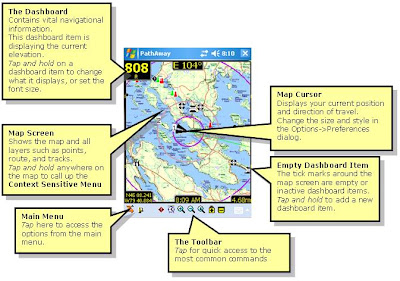


PathAway GPS 5 Is a major improvement over PathAway GPS 4. It sports a new "Finger Touch" user interface, more responsive and faster performance. Also, the dashboard is now transparent enabling you to visualize more of the map without losing the display of important trip information. With the new Trips database structure it is easy to import and export GPX files since all of the data included in the GPX file including Points, Routes, and Tracks, will be contained in the Trips definition. So you can export the Trips as well and all the necessary data will remain together. Also included is a new Elevation and Speed Profile Screen. Great for analyzing the difficulty of a trek, or reviewing performance.


PathAway is all-purpose GPS navigation and mapping software for mobile devices.

PathAway is useful for off-road navigation and mapping activities such as aviation, boating, off-road driving, hiking, cycling, touring, rally racing, motorcycle touring, ballooning, scuba diving, fishing, hunting, paragliding, mountain climbing, ultra-light flying, canoeing, snowmobiling, athletic training, outdoor education, geocaching, mapping/GIS, mining, military training, surveying, site inspection, telematics, field data collection, search and rescue or any application where location is important.

With PathAway you can choose between Standard or Professional Editions.

PathAway Standard and Professional Editions:

* GPS Navigation with most GPS Devices (including Bluetooth)
* Import your own Maps using PathAway Map Manager
* Intelligent Moving Map Display
* Add Personal Points of Interest/Waypoints with notes, photos, and audio
* Record and Follow your Tracks
* Point to Point Routing
* Proximity and off-track Alarms
* Area Calculation and Distance Measurement.
* Onscreen Trip Statistics on a Customizable Dashboard
* Map View, Compass View, GPS Sky View
* Support for Google Earth KML GPX, LOC, or text delimited data
* Transfer Data To and From Garmin, Magellan, and Data Logger GPS Devices
* Map Projections, UTM, OSGB, and Datum support
* Palm OS and Windows Mobile versions

PathAway Professional Edition:

* All of the features of Standard Edition plus new features targeted towards power users and professionals
* Send your Location to other PathAway users or to a central tracking service. Http and SMS support.
* Monitor other remote locations on your handheld.
* Wirelessly download maps from the web on-the-fly. No need to calibrate and install maps beforehand. Includes support for Google maps, Terraserver, and OpenStreepmap.com
* Support for Garmin IMG Vector maps.
* Calculate new Location from relative distance and direction;
* Left/right, high/low directional alarms;
* Pace-keeping features for racing, training, or arrival-time scheduling;

PathAway GPS 5 - Standard Editions

New Features

- Multimedia Points. Add Photos and Sound to captured points. Included support for Camera phones for Photo capture. Click on points and play their sound or display the picture. Proximity indicator shows a thumbnail of the nearest point (if there). Click on the thumbnail for a full view of the picture.

- Track Up Navigation: Automatic or manual Map rotation in 90 degree increments.

- New View Screens. GPS Sky View, Satellite Data View, and Compass View.

- Goto Location: Enter specific location coordinates to position map

- PocketMode Feature : You can now track via your GPS, and save battery life at the same time. Once you enter PocketMode, PathAway turns off the screen (or backlight depending on device), and locks the keys but continues to record GPS data to your track log. If you using a Bluetooth GPS, simply connect the GPS, enter Pocket Mode, and put the handheld in your Pocket! No need to worry about accidentally hitting keys to issue unwanted commands. Use the special key sequence (or power button) to exit Pocket mode and return to the View screen.

- Split Track Here: "Click on a track point and "Split" the track into two at the selected point. Great for dividing up lengthy tracks that only need to be in separate segments.

- Calibrate by 3 or More Known Points: Now you can Calibrate maps that do not have horizontal and vertical longitude and latitude lines, and do not have a known projection. PathAway 4 features new algorithms to accurately calibrate maps by choosing 3 or more known points. Map no longer needs to have perfectly horizontal latitude and vertical longitude lines. Calibration can be done via Map Manager, or on the handheld by selecting the known points on the map.

- Primary and Secondary Position Coordinate Display: Choose two different Position coordinates to display on the dashboard. Now you can show both lat/long and UTM (or any other supported Grid format) at the same time. Or choose a different Datum to display in.

- Optimization for Datums other than WGS84: Previously, there was much overhead when displaying maps and data in different datums. Now there is no perceptible difference in performance across all Datums and Coordinate grids.

- New Coordinate Grids: Quebec-MTM, MGA, GGRS87, Swedish Grid, Irish grid, Israel Grid

- New Datums: RT90, GD94, EGSA87

- Toolbar Hide/Show. Expand your view of the screen by hiding the toolbar. Windows Mobile versions can hide the toolbar, or the top Taskbar to give you the entire screen for viewing.

- Manual And Proximity based Route Point Targeting. Manual means user must select "Advance Route Point" before PathAway will target the next point in sequence. Proximity means you must enter within a proximity of a route point before the next point will be automatically targeted.

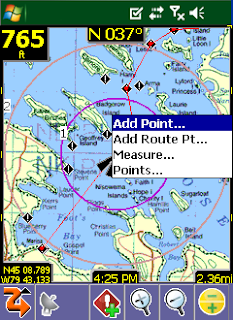
- Measure distance between 2 points: Want to know the distance between 2 points on the map? Simply select Measure... from the Popup menu, and click on the 2 points.

- Large size Icon and Text Menu display: Double the size of the icons for better viewing, or enlarge the text on the menus for arms-length viewing, or easier finger selection.

- Coordinate Grid Lines on Map: Show the latitude and longitude lines on the map. Automatically determines best gapping between lines to keep the screen uncluttered.

- Import GPS data from Data Logger NMEA file: Download data logged in your Data Logger GPS, (I.e.. RoyalTek BlueGPS.) and import the NMEA file directly into PathAway.

- Support for SDIO GPS: Now use your SDIO slot as you GPS receiver. Direct support for SDIO GPS devices added. Ie. Stellus StarNet SDIO GPS.

- New Data Import Formats: GPX, LOC Supported via PathAway PC Conversion Tools, or handheld from the new "Import..." option via Database dialogs. Great for GeoCache users.

- Elevation alarms and warnings: Receive audible alerts when you rise above or fall below specified elevations in relation to the track or route you're following.

- GPS fix acquired and lost alarms: Receive audible alerts when a GPS fix is acquired or lost.

- Custom Alarm Sounds: Add your own sound clips to be used for any of the available alarms. Even attach a sound to a specific point to be played as the "in-proximity" sound.

- On-Map Display of Estimated Travel Time. PathAway displays the ETE on the map by showiing rings indicating the time to reach points on the map. By default, ETEs are set in 1,2, 5, 10, 30, and 60 minute intervals. Customizable in the Preferences>Time dialog.

- GPS Connection Retrys: Option to maintain trying to connect to GPS even if communications are temporarily lost.

- Set Speed and distance decimal precision: Now modify the decimal places to show on the screens used for reporting distances. Preferences-System.

- Depth Tracking: Option to record "Depth" (if available) in elevation data field instead of altitude. Preferences-System.

- "Auto Detect" baud rate. Turn on Auto Detect, and system will cycle through baud rates until if begins to receive a valid stream. GPS Configure Dialog

- Elevation Correction: Automatically adjust elevation to correct for SIRF II Elevation error, or set a fixed elevation adjustment to be applied to all elevation data received from GPS.

- Editing text: Added Tap and Hold menu for Undo, Cut, Copy, Paste, Select All

- Top Taskbar Hide/Show: See View > Show Taskbar


PathAway GPS 5 Standard and Professional

* New Transparent Dashboard. See the entire map even with a loaded set of Dashboard items.
* New "Finger Touch" UI. Uses icon based drill down menus. Main navigation screen is always live while the transparent menu options are displayed. This is to allow the user to choose menu options while on the move and still see where they are going.
* Profile View: Elevation and Speed Profile of current Route.
* Increased performance and better responsiveiness- Fast screen refresh with background data processing. No need to wait for screen refreshes.
* Scale Zoom In and Out: More responsive Zoom In and Out. More zoom increment levels.
* Dashboard; Item Hide/Show now just hides the item (doesn't remove it completely, so you can simply "Show" it when you need to)
* Dashboard XXL Font.
* More Dashboard stats like Time/Dist (useful for timing sports and training activities, ie. 5 min per km).
* Trip Management. Keep your Tracks, Points and Routes together for a specific Trip. Especially useful for Importing and Exporting GPX or KML files. Create Trips, Drag and drop Routes, Tracks, Point databases into a Trip file.
* Start New Trip Wizard: Step by step setup of a trip configuration. Select and existing "Trip" to use or create a new one, choose route or track to follow, and setup track logging configuration.
* Favorites Options for "Finger Touch" UI. Can Add any item to Favorites menu.
* Point Info is now Html based. Basic info is implemented now. Richer formats will be added including imported html from GPX files.
* More Compressed Maps: Create 8-bit maps using a customized color palette. Now create highly compressed maps without losing color quality.
* Track and Route Info showing, total distance, time, and area.
* Tracks/Routes/Point DB/Maps - Supports "Multiple Select" for Delete, Move To... commands.
* "Add Point To Track" and "Add Turn To Track" added as options for Hard Keys.
* New Grid Coordinates: MGRS, Swedish SWEREF99TM, Swiss CHRREF95, CH1903,Warschauer.
* Pocket Mode Preferences options. Now there is an option to keep the screen on with the keys locked so you can pull the unit out for a quick progress check.
* Language selectable from Preferences: In the Multilingual Installer, all available languages can be selected from the preferences in the program. The language option is also displayed on first-time startup. Included languages are English, German, Italian, Spanish, French, Czech, Portuguese, Chinese Simplified and Traditional
* Standard Edition gets some features previously only available in the Professional Edition:
o Find Address by Internet Lookup.
o Sync GPS time with device time.
o Time and Distance Radials.
o Record 3D fixes option for accurate tracking


PathAway GPS 5 Professional - Additional Features

In addition to the above features, the following features have been added exclusively for PathAway Professional Edition.

* Direct Garmin IMG (non-routeable) vector map support. Simply place the IMG file in a PathAway registered folder and it will display as an overlay on the raster maps.
* WebMaps: Support for OpenStreetMap.com downloadable seamless maps.


Download to PC Clickshere


Alternatehere

GPS Sport Tracker windows mobile

[PPC] GPS Sport Tracker windows mobile
All resolutions wm5,wm6.5

GPS Sport Tracker is a small usefull program designed for anyone who enjoys cycling, mountain biking, skiing, running, hiking or walking.
The software provides realtime statistic like current speed, altitude, distance, etc. and data for post analysis using PC.

Main Features:

Speed (current, average, max.), time to pass 1 km (1 mi)
Altitude (current, total up, total down)
Distance
Heading
Metric and imperial units
Time, elapsed time, simple lap timer
Track view with zoom in, zoom out, center start position, center current position
Offline maps, different renders available
Elevation profile, points where max speed, max and min altitude were achived
GPS signal availability, satellite info, settings for accuracy
Simple waypoints, waypoints with a photo, latitude and longitude can be printed on the picture
Save track, export track in GPX format. Log is also available when battery dies
Loading saved tracks (GST, GPX), using saved tracks as a backgorund track
Extended power management, program lock
Bearing back to the anchor, absolute and relative bearing, anchor alarm
Translations
 
Download to PC Clickshere
Alternatehere

Nav N Go iGO 8 v8.3.4.102680 ppc

Nav N Go iGO 8 v8.3.4.102680 Aug 13 2009

GPS Navigation Software for windows mobile based PDA/PNA devices and Smartphones featuring stunning 3D navigation with outstanding graphics of buildings, landmarks, and entire cities. This version has been extracted from iconX G400 PNA device and as usual, it has been patched to work both on PDA and PNA devices as well.


UPDATE - Nav N Go iGO 8 R3 series - v8.3.4.102680 (Aug 13 2009)

- New branch of R3 PNA series, patched to work both on generic PDA & PNA. As well as the previous release, this one is patched to work with the Generic WorldWide license. This release includes some new features such as Driver alerts.

Note:
1. if u have old igo8 - delete all on card and copy all from this rls, then copy only igo8.exe to program files and overwrite

2. if u dont have igo - copy all on card, then copy gpstmc.dll, igo8.exe and sys.txt in \Program Files\iGO8

for omnia put this into SYS.TXT..if you have igo8 folder in my storage/igo8

[folders]
app="My Storage/iGO8"

Download clickshere


Alternate link here

CompeGPS TwoNav Pocket v1.31

CompeGPS TwoNav Pocket v1.31
[ WM 03 / 05 / 06 ]

Don't limit your mobility to just one kind of terrain. With TwoNav you can enjoy the best On-road and Off-road assistance, obtaining a complete solution to your orientation needs.


Use urban navigators' typical features (door-to-door navigation, next manoeuvre, etc.) beside the versatility of the CompeGPS Off-road tools (map viewing, movement stats, position reference edition, etc.). All in just one program.

TwoNav includes high quality urban maps (V-maps) so On-road navigation can achieve the best performance. Moreover, any kind of map (topographic, orthophotos, elevation maps, etc.) may be used to obtain complete information about any terrain (see more info about cartography or visit maps' shop).

A user friendly interface will let you access a great diversity of functions so the software can be adapted to your needs in any situation. Wherever you are, TwoNav will help you find the best way to reach your destination efficiently and safety.

TwoNav Pocket is the version of the program for PDA (windows mobile 2003,2005 y 6).
Features:


General
* 2D or 3D view perspective
* Customizable on-screen data (speed, altitude, time on destination...)
* Up to 3 maps simultaneously on screen
* Track recording

On-road
* CompeGPS V-maps (Tele Atlas) with best accuracy and update level.
* Several ways to choose destination (address, map, historic, home...)
* Automatic route calculation (fastest/shortest)
* Next manoeuvre indication
* Turn-by-turn voice guidance
* Possibility to overlap the road map (V-map) to topographic maps, orthophotos, etc. (not included) (see example).

Off-road
* Compatible with any kind of maps (topographic, orthophotos, etc.)
* Position references edition (waypoints, routes)
* Altitude (graphs, elevation maps, current altitude...)

Content
* TwoNav with license to access all updates within version (1.XX)
* V-map (Tele Atlas) of your zone
* Elevation map of your zone (CDEM) for free

More info :http://www.compegps.com/2006/index.php?detail=detail&opcion=1&lang=0en&prod=155

Twonav.pocket.v1.31.pocketpc
Download clickshere


Alternate link here


Compegps.twonav.pocket.1.53.pocketpc
Download clickshere


Alternate linkhere


Run GPS Trainer UV Pro pocket pc

Run GPS Trainer UV Pro 2.3.2 Build 1532
wm5/6


Run.GPS is the perfect tool for sports like running, skiing and walking. It uses the Global Positioning System (GPS) to record all of your training parameters like speed, distance and altitude.

Run.GPS Trainer UV Pro is the successor of of the award-winning Run.GPS Trainer Analyzer software and has tons of new features. Some highlights: support for all resolutions and screen orientations, support for both smarth phone and Pocket PCs, online friend finder, online route finder, OpenStreetMaps integration, and much more.

Here are some key features of "Run.GPS Trainer UV Pro":

· navigate through unknown terrain, supported by waypoint navigation and route navigation

· import maps directly from GPS-Sport, Google earth and other sources
· hear spoken navigation and training information on your headphones while at the same time listening to music
· create training plans and synchronize with your Pocket Outlook calendar

Requirements:
· Windows Mobile 5/6

What's New in This Release: [ read full changelog ]

· added Instant Trail Mapping support (automatically builds a map layer from all of your tracks)
· some bug fixes

Download to PC clickshere

Google Navigator v5.0 ppc

Google Navigator v5.0

wm 5/6

Google Navigator is a powerful and easy to use GPS navigation software.


Google Navigator is the most powerful and easy to use GPS navigation software on your Pocket PC. Also is the best and most easy to use and convenient software on your Pocket PC. All map data is transferred from Google via network, and save permanently on your device until you want to delete it.

Designed with productivity in mind, Google Navigator offers a quick and easy way to obtain the map and location information on your Pocket PC.With the most powerful functionality on map data operation and convenient user interface.You will enjoy the fun on your Pocket PC.

Features:

Maps:
* Map can change to three view mode: Map Satellite and Hybrid
* Map is transferred via network and save permanently until you want to delete it.
* All the map is constructed to best looking and up-to-date.
* Map data is covered allover the world
* Map can rotated in all 3D angle and move in all directions like Google Earth on your PC
* Full screen mode
* Interactive maps let you zoom in or out in 20 levels.

Street view:
* 3D street view allows you to quickly and easily view and navigate high-resolution, 360 degree street level images of cities in the world.
* If the street view data is downloaded.you can start the street view off line!
* The street view initialize angle is using the current map angle.map angle will automatically move when you move angle in street view.
* You can visit maps.google.com and select the 'Street View' layer to check if your location is support street view.

Search:
* Search the up-to-date location and business via network
* The searched result contains phone number address website act.
* Local business locations and contact information appear all in one place, integrated on your map.

Favorites

* Pick favorite point in favorites folder.
* The powerful favorites folder can pick some favorite locations to appear all in map than can convenient in analytics

GPS tracking:
* Tracking another's position in Google Navigator using the SMS tunnel,no network connection need!
* Position can picked by current GPS position or one point in map then select a contact on phone and send out by SMS automatically
* If the receiver have not open Google Navigator,I will popup a notification to click and open google navigator to display the position automatically.

Navigation:
* Step-by-step voice and turn directions in navigation
* View the map and text directions of next turn
* Change to total view of the route line.
* Change map view in three mode in navigation
* Rotated maps in all 3D angle and move in all directions and zoom in 20 levels in navigation
* Search location or businesses in navigation
* Change destination point or start point in navigation.
* And by just an single click you can return the GPS location in navigation.

Custom path:
* Draw your path and start GPS navigation
* Automatically caculate the turn type like turn left ,turn right after you add the key point
* Easy move,delete,change or insert point when you editing the path

Send Position:
* Send the GPS position or the Selected position by SMS ,MMS and email.
* When sending position using SMS.Google navigation will auto created a message that notify the
receiver go the maps.google.com to input a lat,lng string to check the position.
* When sending piston using MMS or email. Google navigation will created a position link of maps.google.com
as the content to for sending.

Track line:
* Save the track line and load it in Google navigator .
* Support multiple track line loading
* Track line can convert to Google KML format and open it in Google Earth in PC.

GPS information:
* Speed latitude longitude attitude direction satellite count and signal quality can be view in the GPS Info windows.
* The GPS position can sent by SMS MMS or email

What's new in Google Navigator 5.0:
· Fixed can't detect photo or video that taken by camera in some device
· Sort My media in Google Navigator by creation time. you can press left right key to browse the files.
· Fixed bug that misplace map tile when downloading map ,Great Fixed!
· fixed bug that show error message when downloading map in some time
· Decrease 'My media' loading time

Download to PC clickshere

Vito ActiveTrace v2.01 WM Pocket PC 2003/5.0/6.0


Vito ActiveTrace v2.01
Requirements: WM Pocket PC 2003/5.0/6.0, GPS receiver
Overview: VITO Active Trace is a GPS sports tracker that records tracks of your training trips, keeps detailed statistics, and allows marking places of interest by pushpins.


VITO ActiveTrace is a sports oriented software specially designed to help you watch your sports progress. VITO ActiveTrace turns a Pocket PC into your personal coach that accurately keeps detailed statistics for every trip and also records corresponding tracks. Just turn VITO ActiveTrace on, put your device in a pocket and concentrate on training. It is great for any outdoor activity!

Download to PC file

Filibe Soft Filibe Device Locator v1.1 ppc wm5,w6

Filibe Soft Filibe Device Locator v1.1


This software is a very simple way to remotely track windows mobile 6 Professional and Windows Mobile 5 Phone Edition devices. Filibe Device Locator (FDL) extracts coordinates from the GPS of a remote device. If the remote device does not have GPS or the GPS signal is too low, FDL collects cell tower information to calculate an approximate position. The location of the remote device is then displayed on a map.

All operations run absolutely silent on the remote device being tracked. But remember, Filibe Device Locator should not be used to track people without their prior approval.

Download to PC file

Pdaminster.GPS.Videorecorder.v2.0.XScale.WM2003.WM 5.WM6

Pdaminster.GPS.Videorecorder.v2.0. XScale.
WM2003.WM 5.WM6


GPS Videorecorder is an Animation and Analysis Software for GPS
Data. The Software can be used in the same way as a Videorecorder
with Play, Record, Rewind and FastForward. Furthermore you can
add handwritten notes to the video and measure distances and
areas. A Geocashfinder and an interactive help are also part of
the program.

GPS Videorecorder Features:

Animation of GPS Tracks
Realtime Visualisation of all relevant GPS Data
Height and Speed Profiles
GPS Points can be annotated (with Tap-and-Hold)
Editing and Erasing of GPS Points
Many different Unit Formats
ZoomIn, ZoomOut and Overview
KML export to Google Earth
VGA Support
English and German Language
Intuitive Progam Interface
Compact Programsize (250 KB)

Update Version 2.0:
New intuitive User Interface
Handwritten Notes
Digital Rubber
Geocashfinder
Distance Measurement
Area Measurement
Interactice Help

Please note: The program does not run on devices with squared
displays (e.g. 240 x 240)

Download to PC file

GPS Speedometer v1.0 - VGA/QVGA pocket pc

GPS Speedometer v1.0 - VGA/QVGA


Requirements: PPC WM6 - QVGA
Overview: GPS Speedometer is an attractive speed meter on the car dash for windows mobile QVGA phones.

Make sure you have .net framework installed. The setings.exe included in the attachment is from the Microsoft SDK samples, which can be used to set the COM port if you dont' have any other application.

Download to PC file (QVGA)
other clickshere (VGA)

Cradle.Software.GpsSpot.v1.0.2.XScale.WM5.WM6

Cradle.Software.GpsSpot.v1.0.2.XScale.WM5.WM6


You don't know where you parked your car anymore? Have you ever wondered how far your are away from home and in what direction it is? GpsSpot from Cradle Software uses the build in or attached GPS device to show in what direction and how far a previously saved spot is.

Using GpsSpot you can easily save any location and using the build-in or attached GPS device the application will show you at what distance and in what direction the saved spot is.
Without any difficulties you will find every saved spot again, like your parking space, your bicycle in front of yesterdays bar, the next cash machine or bus stop.


Application's highlights:
  • Finger-friendly handling without using the stylus.
  • Saving the current location with just two finger taps.
  • Prevent the device from going to stand-by while the application is running.
  • Displays the distance in meter or miles/yards.
  • The direction arrow can also be displayed in a high-contrast color for a good perceptibility even on bright day light.
  • All currently common device resolutions are supported by GpsSpot.
  • It is possible to switch the language of the application between english and german.
System requirements:
- PocketPC (with touch screen) with Windows Mobile 5.0, 6.0 or 6.1
- Build-in or attached GPS device
download via file

MASPware GPSmeter

Turn your Pocket PC into a precision measurement machine using a GPS receiver.


http://handheld.softpedia.com/images/software/screens/MASPware-GPSmeter-Professional-0.gif


With MASPware GPSmeter you can measure short and long distances using an internal or external GPS receiver. The program shows distance travelled in real terms and/or the linear distance between the start and end positions. Functions accurately whether you're measuring relatively short distances (i.e. in tens of meters) or longer distances, like the distance by car to your work.

Precision depends on used GPS receiver, but you can expect accuracy within 1-5 yards/meter.

Features:
# compatible to NMEA0183 (almost all GPS receiver available support it)
# Metric (m/kmh) and Imperial (yards/mph)
# full WM2005 Support (VGA and landscape)
# Version 2.x updates for free, which means, all Version 2 for without new registration key.

download via file

Mapking 2007 build 0131


MapKing™ is the first pan-region multilingual mobile mapping system in Asia managed by MapAsia.com Limited with input from leading Asian partners.


It is a great tool for trip planning and to explore the huge potential market in Greater China and Asian countries (Maps sold separately for different OS and language). MapKing™ is the first digital map provides English road name and place name in China and Asian cities. MapKing™ has firmly established market leader status as the bridge between western travelers and the rapid growing cities in East.


MapKing™ offers maps in English, Traditional Chinese, and Simplified Chinese. Current maps are available for the following cities and regions, Please check the OS and Language before you purchasedGreater China :Beijing, Shanghai, Hong Kong, Guangzhou, China 2300 cities Points, Pearl River Delta Road Network, Shenzhen, Dongguan Macau Hong Kong Hiking Trial, Taipei, TaiChung, Tainan, Hsinchu, KaoHsiung Asia cities countries :Bangkok, Manila, Singapore with Johor, Jakarta, New Delhi, Tokyo, Kuala Lumpur, Ho_Chi_Minh City Tourist map, Seoul Tourist Map, Asia map

Download and patch it!

Download to PC Clickshere


Download (patch)phonehere

Search This Blog

Related Posts with Thumbnails
Exemptions clause : To visitors,every posts in this blogs are personal recommendations and introductions to downloads and applications are for trial only.You are strongly encouraged to buy the originals from suppliers and manufacturers.