Latest Updates-> SPB Mobile Shell v.3.5.5 New Release!here          New version Inesoftphone v5.07 English Click here          New SPB Mobile Shell Change SKIN v.4.5 Click here          New Documents To Go v3.0 Click here          HTC Espresso Theme For Mobile Shell here          Spb Mobile Shell v3.5.5 build 10087 latesthere
Showing posts with label system. Show all posts

TouchTwit v1.7.3792.37481 Fixed windows phones

[Pocket PC] TouchTwit v1.7.3792.37481 Fixed
PPC WM6 Your phone must have a touch display.

With It’s easy to view your Twitter timeline, messages, replies, favorites and lists.
TouchTwit has a Powerful Tweet-update screen that lets you write Tweets, upload photos and videos,
short url's and include your GPS coordinates. And TouchTwit is always finger-friendly!


Click the Picture to Enlarge

Date: 2010-05-20 / Version: 1.7

- "Could not verify signature"-bug fixed
- crash caused by big avatar bitmaps fixed
- displaying the api-call limit
- search history added (combobox in the search form)
- retweet-api now supported
- location-api now supported
- lists-api now supported
- more-menu gots a new design
- now its possible to upload PNG’s
- GPS fetching bug fixed
- alternative-scroll-mode bug fixed
- copy-, past- and select all-function in all textboxes
- trend-parser optimized
- video-service changed to TwitVid.com
- clean cache function added
- new statistical functions:
- Show all people you are following, but who are not following you.
- These people are following you, but you are not following them back.
- These people are following you, and you are following them back.

System Requirements
Operating System:
Windows® Phone (Mobile) with
version 6.0 or higher.

Device::
Your phone must have a touch display.

Compatible display resolutions:
240x320 (QVGA)
240x400 (WQVGA)
480x640 (VGA)
480x800 (WVGA)

You need the .NET Compact Framework 3.5 on your Windows® Phone.Download here

More Info:
http://touchtwit.net/mobile/

Filename: TouchTwit.v1.7.3792.37481.fix.rar


Download to PC Clickshere
Mirror to PC Clickshere
Alternatehere

WMWifiRouter ppc All collection version

[PPC]WMWifiRouter All Version collection different builds
Requirements: WM5 - WM6.5.X, QVGA, VGA, WQVGA, WVGA

WMWifiRouter - a tool that allows you to use the device as a router between WiFi and cellular networks. This will enable devices with WiFi to access the Internet via a telephone data link


Description Downloads Download link
WMWifiRouter 1.69 build 1227 Cab ENG//WMWifiRouter.v.1.69.Beta.CBD.cab Download here
WMWifiRouter 1.61 build 1126 ENG CAB//WMWifiRouter.v.1.61.CBD.cab Download here
WMWifiRouter 1.61 build 1126 MUI Download here
WMWifiRouter 1.25 Cab ENG//WMWifiRouter_1.25.cab Download here
WMWifiRouter 1.25 Build 600//WMWifiRouter.v.1.25__build.600_.rar Download here
WMWifiRouter 1.30 Build 825//WMWifiRouter_v1.30.cab Download here
WMWifiRouter Version 1.35//WMWifiRouter.v1.35.rar Download here
WMWifiRouter 1.50//WMWifiRouter1.50.cab Download here
WMWifiRouter 1.51// WMWifiRouter_v1.51.rar Download here
WMWifiRouter 1.52 from ZuRiUs//WMWifiRouter_1.52_by_ZuRiUs_for_3ppc.net.zip Download here
WMWifiRouter 1.52 treatment of Dasai//WMWifiRouter.v.1.52.CBD.zip Download here
WMWifiRouter Version 2.0 build 1502 CAB//WMWifiRouter.International.v.2.00.build.1502.CBD.cab Download here

Touch Tools for HTC v2.0 PR1.7

[PPC]Touch Tools for HTC v2.0 PR1.7
Requirements:Windows Mobile 6.5 and 6.5.x ONLY, .Net Compact Framework 3.5.

Touch Tools for HTC is a powerful set of applications that let you modify different settings on your device that would not otherwise available to you.


There are currently 9 applications that make up the full Touch Tools 2.0 Suite:

Touch Tools - This is the main interface for tweaking various system related settings.
Boot Manager - This give various options like Soft Reset, Hard Reset, Bootloader Mode, Suspend, Power Off and Disconnect Data. Can also integrate to Long Press End Key as an Action Screen.
Snatch Screen - Allows for taking screen shots on the phone by shaking the device which stores them to the specified save location. Includes various options.
Rotation Manager - Allows you to add Auto Rotation for applications you choose. Includes automatic Window Info detection: ClassName, EXE Path etc. Has List Import/Export support.
Slim Volume - Allows you to add support for the Slimline Volume display to applications you choose. Includes automatic Window Info detection and List Import/Export support.
Network Folders - Allows you to make use of your Pocket PC's networking capabilities by mapping shared folders on your PC to your device. Also supports Samba/Linux Shares.
PinchZoom Manager - Lets you add Pinch to Zoom support to your applications easily. Includes automatic Window Info detection and List Import/Export support.
HotKey Utility - Extends the End Key Long Press functionality so you can launch a custom application or a specific command: Soft Reset, Hard Reset, Power Off, Enter Bootloader Mode or Disconnect Data.
System Viewer - Allows you to terminate / view running programs and processes and see a list of Device Services. Includes Export option and Compact Mode.

Changes:

1. Added: Bluetooth, WiFi and Phone Radio toggle buttons to Boot Manager for ease of access.
2. Added: Bluetooth, WiFi and Phone Radio toggle buttons to Touch Tools under a new menu called Communication Options under Options.
3. Changed: Disconnect Data option has been moved from Boot / Device Options to Communication Options.
4. Changed: All ListView controls should refresh their items a little quicker now.
5. Fixed: A bug in HotKey Management page where an incorrect registry type was written when saving settings.
6. Fixed: A bug in System Viewer where compact mode would not display correctly on slower devices.


Download to PC Clickshere
Alternatehere

Spb Traveler v.2.9.0 Build 3037

[PPC]Spb Traveler v.2.9.0 Build 3037
Requirements: WM5 - WM6.5.X, QVGA, VGA, WQVGA, WVGA

SPB Traveler is a mobile travel assistant application that helps to keep track of trips, stay on top of meetings even when abroad. SPB Traveler provides travelers with world time and global weather forecasts, with must-have travel tools such as flight search, currency, unit, time and clothing size converters, tip calculator, phrase book, a 3D globe, and even a geographical game for fun self education.


Cities

Track time and weather in your favorite cities

* World Weather
* World Time
* Photo Gallery
* Most Useful Info and Links

Trip Assistant

Manage your trip itineraries

* Nine Types of Trip Items
* Current Event is Always on Top
* Flight Info Auto Complete (OAG)

3D Globe

* Cities and Trips on a 3D Globe
* Animation Effects
* Real Sky Conditions
* Night Shadow
* Education Mode for the Geo Game

Flight Search

* No Subscription
* OAG Flight Search Engine
* 4000+ Airports
* 200+ Airlines
* Search History
* Quick Add to Trip

Tools

A must have traveler tool set

* Currency Converter and Exchange Rates
* Unit Converter
* World Time Converter
* Clothing Size Converter
* Tip Calculator
* Multilingual Phrase Book

Geo Game

Have fun and educate yourself

* World Flags
* World Capitals and Cities
* Education Animation


Download to PC Clickshere
Alternatehere

Wizcode Pocket Mechanic v.2.99.283 ppc

[PPC]Wizcode Pocket Mechanic v.2.99.283
Requirements: WM2003-6.5, QVGA, VGA, WVGA, WQVGA, SQUARE

Powerful Windows Mobile maintenance tools - clean, repair, defragment, format, tweak, free memory, fix outlook issues, optimize

The leading Windows Mobile maintenance utility and winner of the Pocket PC Magazine Best Software Awards 2008 and Handster Best Software Awards 2009 - Pocket Mechanic Professional will keep your device in perfect shape with a robust arsenal of powerful maintenance tools.

With Pocket Mechanic Professional you can:

* Optimize your device for peak performance
* Detect and repair common problems
* Relocate data and installed applications to storage cards
* Increase free memory
* Format, defragment, scan and repair storage cards

Features:
* (NEW) Outlook maintenance - clean and repair issues
* (NEW) Cleanup and repair notification queue problems
* Defragment entire volumes or individual files
* Defragment and optimize the application heap (RAM)
* Scan flash cards for errors and repair them
* Relocate installed applications and data
* Completely uninstall installed applications
* Analyze the storage card slack space
* Logical and low-level storage card format
* Registry cleanup
* Find the largest files on your device
* Find the largest folders on your device
* Find and optionally fix invalid shortcuts
* Clean up notification queue duplicates
* View the contents of the Windows CE database volumes


Download to PC Clickshere
Alternatehere

SPB Mobile Shell 3.5.5 Build 10106

[PPC]SPB Mobile Shell 3.5.5 Build 10106 NEW Build
 Requirements: All CE/WM5,6.x

Customize your device with your preferences


Features:
3D carousel with special effects
Make your own Home screen using widgets
Adaptive skins
Change background
Customize your menu
Change widget skins
Choose Professional or Lifestyle Home screen


Download to PC Clickshere
Alternatehere

Airscanner Mobile Firewall v3.5

[PPC]Airscanner Mobile Firewall v3.5
Requirements: WM5 - WM6.5.X, QVGA, VGA, WQVGA, WVGA


Airscanner Mobile Firewall for Windows Mobile Pocket PC is a low-level, bi-directional, packet filtering firewall that examines all incoming and outgoing TCP/IP traffic. This personal firewall ensures that data is permitted based on access control lists that you select from a set of predefined filters, or from filters that you create yourself. The firewall parses packets as they come in (or go out) on the wire or over the air, and it matches the data against a rule set of ports and IP addresses, URLs, etc.


Features:
Monitor your inbound and outbound of ALL TCP/IP communication (WiFi, GSM/GPRS)
Filter packets at the network level
Control full alerting and logging functions
Quickly select security zones of varying strength
Have the option to ignore (drop packets from) a particular IP address
View a real-time connection overview that lists all currently open ports and their state (e.g., a “netstat” for the Pocket PC) with connected IP address.
Have the ability to define custom filters
Allow trusted computers based on IP address

Trojans, viruses and spyware have already begun to attack Windows Mobile handhelds. Airscanner Mobile Firewall has thus become a vital part of the multi-layered, “defense in depth” of best security practices. Protect your PDA now with Airscanner Mobile Firewall.


Download to PC Clickshere
Alternatehere

KeePass v1.18 ppc

[PPC]KeePass v1.18
Requirements: PPC WM5, WM6

KeePass is a Pocket PC port of an open source Windows security program that stores passwords and other confidental data such as credit card numbers. So it is important to tell you up front that this program mostly designed for those who use Keepass on their desktop machine. It lets them use their .kdb files.
Image

The passwords are groups into customisable categories by icons and are very easily accessible. They appear in full only if you select them. Note that the program can generate passwords too.

Unlike the market leaders in this type of program (all the commercial ***wallets), the file structure is not customisable, which greatly reduces the ease of use. Still, for obvious security reasons, closing of the program needs to be automatic after a certain time. I won't risk trusting my ATM card number to it, but less sensitive data, it is worth a look because it can use Keepass data.


Download to PC Clickshere
Alternatehere

HTC Sim Manager v6.57

[PPC]HTC Sim Manager v6.57
Requirements: Windows Mobile 5 Phone Edition,Windows Mobile 6.0 or 6.1 Professional all HTC device


Your Pocket PC phone is designed to store call information and contacts on your device, not the SIM Card. SIM Manager lets you view the contents of your SIM Card, transfer your SIM Card contacts to your device and make a call to contacts in your SIM Card.

Info:
- Calling Contacts from your SIM Card
- Creating a Contacts to SIM Card
- Transferring All SIM Card Contacts to Device
- Saving Personal Number
-And other...
Instructions: Download and extract copy .exe file to your device if you have previous version, just copy & replace to Windows Folder.


Download to PC Clickshere
Alternatehere
WisBar Advance v.4.0.7 build 22 ppc

[PPC]WisBar Advance v.4.0.7 build 22 windows phone 6.5
Requirements: WM2003-6.5 All resolutions

WisBar Advance expands upon the successful task management features found in the WisBar Advance 3.


Included in WisBar Advance is the ability to customize your running applications to a degree not seen in other programs.

With the ability to close apps, WisBar Advance keeps your device running as fast as possible, leaving more memory available for any application you may use.

WisBar Advance also brings new life to your Windows Mobile phone with the ability to change the appearance of your system to a degree not matched in other software.

Features
* Compatible with WM2003, WM2003SE, WM5 and WM6, WM6.5 and WM6.5.1 touchscreen devices
* Customize the close button, the screen orientation and the SIP on a per-application basis
* Switch between any application currently running on your device
* Provides a finger-friendly start panel or a cascading start menu
* Tap and hold the OK button to cancel a dialog
* Add or remove functions to the status bar
* Each button on the status bar can be assigned a tap and a tap-and-hold action
* Place shortcuts in the system tray for easier access from the Today screen
* Customize a "User Menu" with applications of your choosing
* Change the appearance of the status bar, menubar, buttons and start menu in any program
* Supports all resolutions through the use of themes
* Customize the clock's appearance on the taskbar
* Hear sounds for system events, just like on your desktop
* Download and install themes created by other people
* Provides finger-friendly menus and message boxes
* Switch between running apps using thumbnails of each app

Version 4.0.7 build 22
* Added the ability to close windows in the enhanced task panel by tapping and holding on a window.
* Fixed a problem where the virtual keyboard would disappear in some programs.


[VGA/WVGA]Download to PC Clickshere
[VGA/WVGA]Alternatehere


[QVGA/WQVGA]Download to PC Clickshere
[QVGA/WQVGA]Alternatehere


[WM2003 Verison]Download to PC Clickshere
[WM2003 Verison]Alternatehere

Skyscape Global Keygen v2.6 Updated

[PPC] Skyscape Global Keygen v2.6 Updated
Requirements: WM3,5 - WM6.5.X, QVGA, VGA, WQVGA, WVGA

For all of the medics like me, I find that all of my medical reference materials can be obtained from skyscape.
Join up with skyscape to get your free account.
Select all of your reference materials, and install them onto your PPC in trial mode.
Copy the keygen (link below) into your "My Documents folder". Enter your five digit code (you'll see this code when you run any of the Skyscape programmes and see the "nag" screen) - and ENJOY!!!

Home Page: http://www.skyscape.com/index/home.aspx


Download to PC Clickshere
Alternatehere

Wizcode Data Recovery Mobile v.1.06.014

[PPC]Wizcode Data Recovery Mobile v.1.06.014 windows phone 6.5
Requirements: WM2003-6.5, QVGA, VGA, WVGA, WQVGA, SQUARE

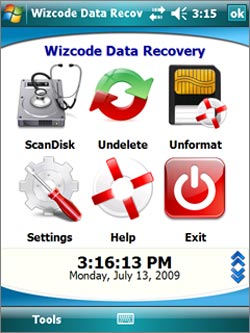
Complete data recovery solution for Windows Mobile devices using flash media. Fix errors, recover deleted files and lost data.


Wizcode Data Recovery Mobile is an affordable alternative to expensive desktop based data recovery software without sacrificing any of the features of such products. It is a must have for every Windows Mobile device using storage cards.

Use Wizcode Data Recovery Mobile to:

* Recover deleted files and folders.
* Recover data from formatted storage cards.
* Restore lost files and data.
* Check storage cards for file system logic errors and fix them.
* Check storage cards for bad sectors and relocate and mark defective sectors as unusable.

Wizcode Data Recovery Mobile features 3 independent data recovery modules that complete each other and should be used accordingly to the situation:

* ScanDisk – use to find and fix file system errors, bring back files that have disappeared files, or after a critical lock up when the device had to be rebooted while accessing the storage card.
* Undelete – use after an accidental deletion of important files and data on the storage card.
* Unformat – use when a storage card has been accidentally formatted or when Undelete was unable to rescue deleted files or folders.


Download to PC Clickshere
Alternatehere

SPB.Wallet.v2.1.2.Build.12109 ppc

[PPC]SPB.Wallet.v2.1.2.Build.12109
Requirements: WM5,6.5, QVGA, VGA, WQVGA, WVGA


SPB Wallet is a secure and manageable storage of sensitive information, such as passport and account numbers, access and PIN codes, logins and passwords. The encrypted and password-protected data can be accessed from Windows PCs, and synchronized with mobile devices.

Cards
* Cards look like those in your wallet
* 60+ predefined templates, icons and graphics
* Online Template gallery with 10,000+ cards
* Fully customizable
* Alternative views

Security
* Strong 256-bit AES encryption
* User-friendly logon panel helps against key loggers
* Automatic wallet lockup
* Automatic clipboard cleanup
* Special engine to protect from 'phishing' attacks

Mobile
* Finger-friendly user interface with smart scrolling, gestures and animation effects
* Auto fill for user name and password in Pocket Internet Explorer
* Smart tags to call/SMS/email/etc
* Quick search
* Password generator

Desktop
* Easy to use desktop interface
* Import from eWallet, FlexWallet, CodeWallet, SplashID, HandySafe and custom CSV
* Sync with mobile device, file share and Google mailbox
* User name and password auto fill for websites in Firefox and Internet Explorer
* Drag-and-drop for card fields into other applications
* Quick search
* Password generator

Web Integration
* Works with Internet Explorer and Mozilla Firefox
* Navigate to your web site quickly
* Fill login info with one click
* Automatic capturing card directly from browser
* Password Generator to make registration quicker and web surfing more secure
* Special engine to protect from 'phishing' attacks

Template Gallery
* 7,000+ most popular card templates
* You can order a new template absolutely FREE
* Integrated to application
* Search by country, card type and keywords


Download to PC Clickshere


Alternatehere

Sprite Backup v6.5.5 Build 11 windows phone 6.5

[PPC] Sprite Backup v6.5.5 Build 11 windows phone 6.5
Requirements: WM5, 6.0, 6.1, 6.5 All Resolutions

Award-winning Backup for Windows Mobile 5 or Windows Mobile 6 (Pocket PC and Smartphone).


If you have customized your device with productivity applications or if you don't want to lose your call history, SMS messages, pictures, ringtones and more, then make the smart choice for your smart device.

What makes Sprite Backup 6 the BEST?

* Support for Windows Mobile 6 Storage Card encryption - Only Sprite Backup will restore your encrypted data after a hard reset
* Fully automated off-device Backups - You don't just backup your PC to the internal hard drive. Do you?
* Unique Device Upgrade Mode - Restore to a replacement device or after a ROM Upgrade
* Desktop Companion - Browse your backup files or configure your backup schedule from the comfort of your desktop.

Product Features

* Supports ALL WM5 & WM6 Devices - Smartphone AND Pocket PC
* NEW Backup to FTP Server - Now supports remote backup for additional protection
* Backup to PC - Increased protection by moving backups off-device
* NEW Sprite PC Manager - Easy setup & instant data protection
* Sprite Explorer - PC Tool for browsing and extracting backup file contents
* Upgrade Mode Recovery - Restore to a replacement device or after a ROM Upgrade
* NEW Support for WM6 Storage Card encryption - Access ALL your data after a hard reset
* Full & Custom Backup and Restore operations - offers complete control
* Self-Extracting Backup Files - Restore backups without re-installing
* Automatic Scheduled Backup - ensures up to date content protection
* Automatic Backup File Management - Optimize storage space used


Download to PC Clickshere


Alternatehere

WM Sound Recorder v.2.1 windows phone

[Pocket PC] WM Sound Recorder v.2.1
Requirements: WM5-WM6.5


To record your mobile calls? Get bored with pressing the buildin record button every time you want to record on your mobile? WM Sound Recorder is an easy-to-use application which could auto record sound and phone calls in Windows Mobile Pocket PC. And it also can play the record file so that you can check if the record fits you. In addition, you may distribute your recorded files easily with it. Recording and playing audio on phone has never been so easy with WM Sound Recorder!

WM Sound Recorder Key Features:
• Auto record phone calls including outgoing and incoming calls;
• Record sound and phone calls to *.mp3 and *.wav audio file;
• Three recording quality for choosing: Low, Normal and High;
• Support monaural and stereo recording & Support 22 kHz to 44 kHz,44Kbps to 176 Kbps for choose;
• Support set to record every phone call, today's phone calls and next phone calls, not record any call.
• Buildin player to play *.mp3 and *.wav audio file;
• Support send recording file via Bluetooth and email;
• Support custom recording file store folder;
• Support unlimited time recording;
• Support VGA and WVGA Screen (such as HTC Touch HD/2 and Diamond/2).


Download to PC Clickshere
Alternatehere
Alternatehere

XTreme Tweaks v1.1 windows phone

[PPC]XTreme Tweaks v1.1 windows phone
Requirements: 1. Windows Mobile 6.5 2. VGA\WVGA\QVGA\WQVGA Resolution 3. .NET Compact Framework v3.5


Best application for Windows Mobile 6.5 customization/personalization. Easy to use, finger friendly, NO NEED FOR STYLUS!. Available in both VGA and WVGA Resolution!
Image

XTreme Tweaks, best tool for Windows Mobile 6.5 personalization/customization. Easy to use, finger friendly, NO NEED FOR STYLUS!.

-- CHANGES FROM v1.0 TO v1.1 --

- Fixed imposibility to set GUI Tweaks on some devices!

- Improved Speed and Stability!

- Easy Install!

Available in both VGA and WVGA Resolution!

--GUI Tweaks--

1.Start Menu Columns - Allows you to choose how many columns you want in Start Menu.
2.Scroll Bar - Choose how your scroll bar will look like. The change can be visible in Phone, File Explorer, etc.
3.Phone Keypad - This option allows you to set the theme for Phone keypad. The change can be visible in Phone.
4.ClearType - If ON, ClearType will be activated.

--System Tweaks--

1.SMS Sent Message - If OFF, this option will disable the SMS sent message.
2.STK Services - If OFF, this option will disable the SIM Operator (Network Operator) options. This will not set your Phone into Flight Mode. The change can be visible in Start Menu - your Network Operator icon.
3.Increase Font Cache - If ON, font cache will be increased.
4.Increase TCP/IP Cache - If ON, TCP/IP cache will be increased.

--Other Tweaks--

1.SIM Contacts - If HIDE, all SIM contacts visible in Contacts will be hidden.
2. Auto-Lock - If ON, your Phone will auto-lock after 50 seconds or at power button press.
3. SMS Threading - If OFF, SMS Threading will be disabled. This change can be seen in Text/Messaging at your messages.
4. Customer Feedback - If OFF, Customer Feedback will be disabled.
5. Error Reporting - If OFF, Error Reporting will be disabled.
6. In Call Recording - If ON, this option will allow call recording, see the option available when making a phone call. The recording will be saved in My Voices.
7. Right SoftKey - This option is visible with Windows Default as Today at the right Softkey.
8. SmartTouch - If ON, SmartTouch will be available in most programs.

MORE FEATURES

- Finger Scrolling !
- Big Icons/Buttons, finger friendly, no need for stylus !
- Landscape Support !
- Cool Graphics
- Most Daily Use Functions
- EASY to USE !
- Rapid menu access
- Help
- Restart Device
- Restore To Default
- .PNG Start Menu Icon


Download to PC Clickshere
Alternatehere

Palringo v2.4.4 PREMIUM

[ WM 05 / 06 ] Palringo v2.4.4 PREMIUM


What's New in This Release:

· Completely new install/uninstall process
· Automatic updates now only notify users that an update is available - downloading is manually approved
· Settings and Display and Group join/leave alerts
· Settings and Display andContact List (item size) option
· Settings and Display and Tab size option replaces "Large Buttons" option.
· Contact list can now be filtered by service type, so you can effectively have a separate list for Facebook/MSN/Yahoo etc.
· Added private message spam filter for Palringo service
· Edit Profile link from overview screen
· Automatic detail expansion display on reduced contact list items
· Mousewheel support for tab selection
· Optimised list rendering code
· Fixed 32-bit scrolling issue with large lists
· Optimised avatar rendering
· Default filenames for saving images
· Reformatting of photos has been made more reliable
· Miscellaneous other (more and  more) bug fixes and optimisations

Download to PC Clickshere


Alternatehere

For newer version Palringo v2.5.6 PREMIUM Click link here

BattClock v2.1.2 pocket pc

BattClock v2.1.2
Requirements: Windows Mobile 5/6.x
Overview:
BattClock shows Time and Battery percentage above the top bar.

Here are some key features of "BattClock":
· Very small in memory: 1 Kb in memory (check it with a task manager)
· No CPU usage: 0.00 % CPU usage, check it with a task manager)
· Very small on disk: BattClock.exe 17 Kb on disk, BattClock.CAB 16 Kb on disk,
· Very efficient resource usage (clock update and measuring of battery percentage)
· Time and Battery percentage above the top bar
· Automatic detect settings the first time started, dependent of the screen resolution and colour.
· 12 hour clock possibility
· Date possibility in format DDMM or MMDD
· Only Date, Time or Battery Percentage possibility
· Indicator if charging (battery percentage character % is changed into tilde character ~)
· Clock width, height, X position and Y position configurable
· X position from the left configurable
· Automatic runtime adaption of BattClock on Portrait or Landscape mode (with negative ClockX setting)
· Background and Foreground color configurable
· FontSize configurable
· Configurable via registry settings (or configure via TouchLockPro BattClock Settings screen and than uninstall TouchLockPro)
· Supported resolutions: 240x320, 240x240, 480x480. 480x640, 480x800, etc.

What's New in This Release:
· Fixed bug that Stripe settings were incorrectly changed when switching to next/previous stripe item
· When battery is charging and battery stripe is enabled, alternate between the configured high and medium and low color each second
· Added Arabic translations

Download to PC Clickshere


Alternatehere


Alternatehere

Send Contact v1.02 freeware pocket pc

Send Contact v1.02 (Freeware)
Requirements: wm 5, 6, 6.1, .NET Compact Framework 3.5

Overview:
 Send Contact lets you quickly sharing a contact information.


Send Contact is the best way to comply with immediate requests to transmit contact information about particular persons without running special programs or typing the text yourself.

Just press the button, and the recipient will instantly get the required information in the SMS format.

The program does not have to be installed on the recipient's device, which comes in handy.

Download to PC Clickshere


Alternatehere

Screen Alive v1.11 pocket pc

Screen Alive v1.11
Requirements: PocketPC 2003(SE), WM5, WM6
 Overview:
 Screen Alive is a simple application that easily and temporarily overrides your screen power settings so that the screen will not dim or shut off while Screen Alive is running.

Most Screen Alive users find it to be a useful application to quickly and easily keep the screen active while using GPS applications, reading eBooks, listening to music, playing games, or actively working on tasks where they don't want to be bothered by a screen that dims or shuts off. Screen Alive conveniently starts minimized so you can quickly resume the activities or applications you were working with. As soon as you close Screen Alive, your screen power settings will revert back to normal.

Download to PC Clickshere


Alternatehere

Search This Blog

Related Posts with Thumbnails
Exemptions clause : To visitors,every posts in this blogs are personal recommendations and introductions to downloads and applications are for trial only.You are strongly encouraged to buy the originals from suppliers and manufacturers.