Latest Updates-> SPB Mobile Shell v.3.5.5 New Release!here          New version Inesoftphone v5.07 English Click here          New SPB Mobile Shell Change SKIN v.4.5 Click here          New Documents To Go v3.0 Click here          HTC Espresso Theme For Mobile Shell here          Spb Mobile Shell v3.5.5 build 10087 latesthere
Showing posts with label video. Show all posts

Media player TCPMP v0.72 Rmvb special edition

[PPC] Media player TCPMP v0.72 (Rmvb special edition)
Requirements: WM2003 - WM6.5, QVGA, VGA, WQVGA, WVGA


The strongest handheld video player software, watch AVI movies of choice. Support many media formats, you can call it the Palm device [super king]! And you can use it to completely replace the equipment that comes with any player. New version update extremely fast, if your device is not installed within this powerful media player software, it is very regrettable.

TCPMP supports the following media formats:

AAC.AC3.AVC.AMR.3GP.H263.OGG.OGM.MKV.MKA.ASF.WMA.WMV.WV.ASX.WMX.
WVX.WAX.NSV.FLAC.M1V.M2V.M3V.M4V.MPC.MPEG.MPG.MPV.MPA.MP1.MP2.MP3.AIF.SAP.CMC.
CMR.DMC.MPT.MPD.RMT.TMC.TM8.TM2.MP4.M4A.M4B.MKV.MKA.M3U.K3G.JPG.JPEG.SPX.AVI.


2010-11-11 updated on TCPMP Team LBE "RMVB special edition"
Support for Smartphone 2003/2003SE/5.0/6.0/6.5, Pocket PC 2003/2003SE, Windows Mobile 5/6/6.1/6.5, Windows CE 5.0/6.0
Support for RA / RM / RMVB format audio and video files. Audio coding, including: COOK, AAC, AC-3; video encoding, including RealVideo G2, RealVideo 8, RealVideo 9 / 10
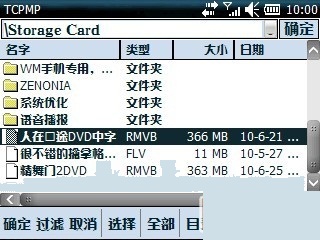


In HD2, TG01, etc. 1GHz CPU models, can play 1Mbps stream, 1024x576 resolution, RMVB video
The PXA310 at 800MHz or S3C6410 CPU models, can play 700kbps stream, 720x480 resolution, RMVB video
The MSM7200 528MHz CPU in the series of models that can play streaming 400kbps, 720x480 resolution, RMVB video



Performance Optimization Guide (depending on your CPU type setting TCPMP, the best playback):
1. HD2, TG01, etc. 1GHz SnapDragon CPU models:
Options -> Video -> smooth scaling: to ensure that 50% of the smooth zoom and smooth zooming are not always selected (by the graphics hardware scaling)
Options -> Video -> Video Driver: Select the DirectDraw
Options - "Settings -> DirectDraw: make sure" Use Blitting replace the overlapping, "" equipment used for the Blitting stretch "have not been selected; Overlay format: select YV12, if the play Huaping, select YUY2

You can use the locking software to lock the CPU frequency to 998MHz, you can get smoother playback

2. 528MHz to MSM72xx CPU models (most of the HTC machine are the CPU):
Options  and Video and smooth scaling: to ensure that 50% of the smooth zoom and smooth zooming are not always selected (by the graphics hardware scaling)
Options   and Video  -> Video Driver: Select the DirectDraw
Options - "Settings  and  DirectDraw: make sure" Use Blitting replace the overlapping, "" equipment used for the Blitting stretch "have not been selected; Overlay format: select YV12, if the play Huaping, select YUY2

3. 667/800MHz S3C6410 CPU models (Acer F900/M900, M8/Q5, etc.):
Options  and Video  and  smooth scaling: to ensure that 50% of the smooth zoom and smooth zooming are not always selected (by the graphics hardware scaling)
Options  and  Video -> Video Driver: Select the DirectDraw
Options - "Settings  and  DirectDraw: make sure" Use Blitting replace the overlapping, "" equipment used for the Blitting stretch "have not been selected; Overlay format: YV12 options

4. PXA255/PXA263/PXA270/PXA310/PXA312/PXA320 models:
Options and Video  and  smooth scaling: to ensure that 50% of the smooth zoom and smooth zooming are not always selected (by the graphics hardware scaling)
Options  and  Video  and  Video Driver: Select the Intel XScale
Options - "Settings  and ; Intel XScale: three options are selected to ensure

Known issues:
RMVB file can not re-play after play, you must re-open the RMVB file, or TCPMP player

2010-11-07 Day, XDA updated TCPMP-0.72RC2-ARM-REV31.
1. The H264 coding has been updated, Qualcomm's CPU hardware solutions will Huaping. However, do not update any coreplayer H264 encoding, and new version of TCPMP perfect solution.
2.Due to some H264, MKV with AC3 encoding, so coreplayer plays no sound and WMP, HTCVIDEOPLAYER do not support MKV, while the new version of TCPMP perfect solution.
3. RMVB plug-in added support drag the progress bar, the screen smoothly, but the audio and video are not synchronized.
4.This version of TCPMP playing some H264 smoothly than the coreplayer
5.With WVGA skin, the other resolution, please find the corresponding resolution of their skin.

Proper Settings below 

1.options-video "smooth zoom(only 50%)" and "smooth zoom(always) are not selected";
2.options-video "directdraw" is selected;
3.options-settings-directdraw "use blitting instead of overlay" and "use device stretching for blitting"are not selected.

Come with TCMP nice skins


Download to PC Clickshere
Alternatehere

Smooth YouTube Downloader v2.1 ppc

[PPC]Smooth YouTube Downloader v2.1
Requirements:PPC WM5 , WM6 - NET CF3.5

basically it allows you to search and download videos from YouTube in different formats and qualities, including MP3.


Features:

Shows thumbnails in the search results.
Ability to download multiple videos at the same time.
Ability to pause/resume downloads after you exit and run the application again.
A very nice UI and cool transitions between different screens of the app.
Ability to expand search results.
Ability to choose video format/quality including mp3.
Improved QVGA screens support.
Ability to switch between full screen and normal mode.
Ability to copy download URL.
Supports keeping the device awake while downloads are running, so the WiFi connection is not lost.
Supports installing extensions to support any other video site.
Supports Themes.
Supports DailyMotion as well.

Changelog:
v2.1 (31/08):
Now in V2.1 you can make any format default format.
And you can also specify an application to open the URL with (CorePlayer, TCPMP) directly from the "Format/Qaulity selection screen"
Also it supports shortening the URL before passing it to the application or before copying the URL, in case you decide to use CorePlayer which requires shortening.

Download to PC Clickshere
Alternatehere

Online TVx v3.2.0 ppc

[PPC]Online TVx v3.2.0
Requirements: Windows Mobile 5.0 or higher, RAM 128 mb
Complete professional edition, More than 800 TV channels, Best alternative to cable/satellite television, Automatic Program and Channel Update, Multilingual Support, G-sensor support

Sky News
Fox 11
Deejay TV
Rock TV
ITV
Star TV
Eurosport
Automoto
...more than 800 channels

Filter by Countries
USA
UK
Canada
France
Germany
...more than 80 countries

Filter by Genre
Entertainment
Kids
Live
Movie
Music
News
Religion
Sport

Instalation instructions:
Extract archive using this password: Cracked by ubaqiry
Install OnlineTVx_3.2.0_Setup.CAB preferably in \Storage Card
Replace your original OnlineTVx.exe with cracked OnlineTVx.exe from Crack directory
The application should to be installed in \Storage Card\Program Files\Online TVx


Download to PC Clickshere
Alternatehere

GRemote Pro v1.4.7 ppc

[PPC]GRemote Pro v1.4.7
Requirements: Windows Mobile 5/6, .NET Compact Framework 2.0, Joystick feature works only for Samsung Omnia i900 and HTC devices with GSensor (Diamond, Touch Pro, Touch HD)

GRemote Pro can be used to control your PC using the PDA, and works as mouse, keyboard, analogue joystick, you can use it as PC remote controller.

The main difference in Pro version is that you can reconfigure everything. You can edit skin, add new applets and buttons, you can assign new function for buttons!!!

Every button can be assigned to function like:

Keyboard event

System

Run application
Open file
Display OSD
Change display settings (resolution, refresh rate, colour depth)
Volume control
Mouse click

Gremote function - most of this functions are used to define client actions.

Exit to welcome screen
Switch to applet
Enable/Disable command group - this function allows to define many profiles to one applet
Open SIP Keyboard
Touchpad surface
Scroll surface
GMouse surface
GMouse - toggleTouchFree
GRace - ON/OFF
GRace - Joystick button
Alt,Ctrl key toggle

Predefined application function

Winamp control
Windows Media Player
if you are using other application send the developer their names or URL and they will try to add them, but they need to have SendMessage API, the others applications you can control by hotkeys.

What's new in GRemote Pro 1.4.7:

· Wake On Lan function added
· better Bluetooth initialization
· new applications in program library
· fixed Bluetooth issue on devices with Broadcom/Widcomm stack - BT radio is not enabled when it is not used
· fixed problem with broken configuration files
· removed conflict with AVG antivirus software (application hangs about one minute when you tried save any options)
· removed problem with connection timeout when you are using Winamp and try to add directory with many files
· Bluetooth library updated


Download to PC Clickshere
Alternatehere

Online TVx v3.0.1 ppc

[PPC]Online TVx v3.0.1
Requirements: WM5 - WM6.5.X, QVGA, VGA, WQVGA, WVGA


Complete professional edition
More than 800 TV channels
Best alternative to cable/satellite television
Automatic Program and Channel Update
Multilingual Support
G-sensor support


Installation instructions:

Extract archive
Install OnlineTVx_3.0.1_Setup.CAB preferably in \Storage Card\
Replace your original OnlineTVx.exe with cracked OnlineTVx.exe from Crack directory
The application should to be installed in \Storage Card\Program Files\Online TVx


Download to PC Clickshere
Alternatehere

Getytv Get youtube videos v1.4

[PPC]Getytv Get youtube videos v1.4
Requirements: Netframework 3.0 and windows mobile 5 above


Getytv - Get youtube videos v1.4

Getytv Version 1.4 available
*Audio/Video Extractor *Deep Search with AI
*Multiple Formats with resolutions *Stable Liks
*Blank Format Bug Fixed *Paste from Clipboard in URL based Downloading.
*Many internal Code Fixes Above is for those who cares....& for all others Did you paid for this ? No?
Better Participate in improvement by submitting Bug Reports.

Getytv - Get You tube Videos is an application to download Youtube videos directly on your mobile.
Download videos in 3gp , flv , mp4 , mp4(hd)

Changes from previous version(1.2)

- Download Format bug fixed.
- Search bug fixed.
- More phone models support.
- Several internal code changes
Download and enjoy your fav videos


Download to PC Clickshere
Alternatehere

Nero.ShowTime.Mobile.v1.2.0.13 windows phone 6.5

[PPC] Nero.ShowTime.Mobile.v1.2.0.13 windows phone 6.5
Requirements: WM 5,WM6,6.5 All resolutions


With Nero ShowTime Mobile, you can experience the ultimate Nero Digital™ quality on the go! You now have the ability to take your movies and music with you directly on your Smartphone/PDA or play back content remotely from your home PC equipped with Nero MediaHome and UPnP™. To learn more about Nero Digital™

Supported hardware platforms:

* Major SmartPhone/PDA architecture with the Intel® XScale™ or ARM® series of processors
Supported software platforms:

* Microsoft® Windows CE™, PocketPC™, Windows Mobile™

Supported audio formats:

* Nero Digital™ Audio (MPEG-4 Audio), AAC, HE-AAC, HE-AAC v2, MP3, Ogg Vorbis, WAV

Supported video formats:

* Nero Digital™ (MPEG-4 Video, including AVC/H.264)

Supported file containers:

* .mp4, .m4a, .mp3, .wav, .ogg

UPnP™

* Auto-discovery of UPnP™ devices on the network
* Full Support for Nero MediaHome

To get an overview please check out the gallery.
General Features

* Enables playback of Nero Digital™ content on mobile/portable devices
* Supports major mobile software platforms
(Microsoft® Windows CE™ / Pocket PC™ / Windows Mobile™)
* Supports major mobile hardware platforms (Intel® XScale™, ARM®)
* Fully optimized software code for each hardware/software platform guaranteeing the best performance and long lasting battery power
* Unique and intuitive Nero look and feel on all supported platforms
* Support for a wide range of multimedia content (MP3, OGG, WAV)
* Portrait and Landscape views for video playback, support for view rotation and full screen playback
* Support for UPnP™ and remote file playback/streaming
* Full support for Nero MediaHome including remote multimedia content exchange
* Digital Equalizer with built-in presets (Jazz, Rock, Dance…)
* Playlist editor
* Support for multiple playlists


Download to PC Clickshere


Alternatehere

RMVB Playback on windows phones media player

RMVB Playback on windows phones media player


The current high rate rmvb best solution! Performance is far better than other software!the windows media playerplug-in, performance

Current best player ppc real solution!
-Specifications version 2.0
-real plugins
-Video processing

Instruction:

Step 1: Install 1.reg using and Registry Explorer
Step 2: Copy the rest of the four files to /windows directory
Step 3: Restart
Step 4: Use windows media player in your mobile to plays

After testing, the 528mhz cpu running on 640 * 352 films run very smooth and Pictures sync good.

I've been watching rmvb ppc a large format.Enjoy


Download to PC Clickshere
Alternatehere

GETYTV 1.1 Get YouTube Videos

GETYTV 1.1  Get YouTube Videos
 Requirements: PocketPC 2003(SE), WM5, WM6
Overview: Download Youtube Videos on your Windows mobile in multiple formats. Getytv can download Movies,Videos,Music in .flv , .3gp , .mp4 , .mp4(hd) formats. Designed Specially for HTC devices


Download Youtube Videos on your Windows mobile in multiple formats. This is a youtube video Downloader for Windows based devices , Keep YouTube in your pocket now. Download any video any time on your device.If you are tired of slow streaming this application is best for you. You can keep the videos in your mobile for future use , Make a cool collection etc. Get yourself GETYTV n enjoy Youtube. Getytv can download Movies,Videos,Music in .flv , .3gp , .mp4 , .mp4(hd) formats. Designed Specially for HTC devices.

Download to PC Clickshere


Alternatehere


Alternatehere

myPlayer Version 1.10 pocket pc windows phone

myPlayer Version 1.10 pocket pc Freeware
Coolest Player for Streaming player for BBC and HULU sites etc ....and many more


myPlayer is a light-weight application that provides access to BBC iPlayer, Hulu, Five On Demand, MSN Video and SBS directly - eliminating the requirement of a (flash-enabled) mobile browser.

Features:
- Choose your own media player - define how each stream is played (CorePlayer v1.3.6 is recommended)
- Full iPlayer integration - browse the Mobile content as you would from any other supported device (including the search feature)
- Download high quality BBC iPlayer episodes directly to your device for offline viewing
- Hulu support (beta) - watch a selection of your favourite cartoons
- Five On Demand - catch up with the latest content from Channel Five
- MSN Video - a further selection of streaming content from the UK
- SBS Australia - content from the Special Broadcasting Service*
- Live TV channels - watch the popular terrestrial channels live (BBC1, ESPN, Sky News, etc.)
- Extensive TV feed index - hundreds of live TV feeds from around the globe
- Live Radio stations - a selection of BBC broadcasts
- Custom TV / Radio stations - add your favourites
- Search History - tracks the most recent searches for easy access
- myPlayer streaming service - preconfigured VLC server to overcome connectivity issues (eg. blocked ports, non-UK region, etc.)

Download to PC Clickshere


Alternate

SPB TV v1.1 pocket pc

SPB TV v1.1
wm5/6


Spb TV is a highly usable IP-TV solution, optimized to run on mobile device. Spb TV provides users with lots of channels in multiple languages with easy-to-use features and settings. No subscription fee!

Features:
* More than 100, subscription free, TV channels:
- A wide selection of public TV channels
- Quick channel preview
- Integrated TV guide
- Quick channel selection
- Channels from more than 17 countries

* Full Screen TV Player with Picture-in-Picture Mode:
- Picture-in-picture mode
- Fast channels launch and switching
- Volume and backlight controls
- Onscreen and hardware buttons controls
- Network bandwidth fluctuations support


Version 1.1 (Jul 16, 2009):
* Channel switching speed improved
* Video acceleration support for new devices improved
* Automatic deactivating for out of serviced channels added
* Autoupdate ability added
* Issues with volume buttons on some devices is fixed
* Issues with backlight on some Palm and HTC devices fixed
* Issues with internet connections and different proxies fixed
* Other minor bugfixes

Download to PC (1.8mb) clickshere

SmartMovie Player v4.00 pocket pc

SmartMovie Player v4.00

Play your videos on your mobile device ,anywhere, anytime, you need just a few steps.Convert any video file on your PC into a phone-friendly video file


Play your videos on your mobile device,anywhere, anytime, you need just a few steps
* Convert any video file on your PC into a phone-friendly video file
* Upload video into device/memory card
* Play the video in SmartMovie Player installed on your mobile device

Features:
* Standard AVI format, allowing you to preview converted files on your PC
* Also plays MP4V and 3GP file formats
* Player uses the phone screen in portrait or landscape mode, utilizing full screen size of the device
* Rescaling of video to utilize full-screen area
* Support for subtitles - allowing you to watch movies in different languages
* Friendly PC converter - preview videos on PC, select parts you want to convert, change conversion quality
* Converter supports DirectShow codecs, so you may use video codecs downloadable from the internet
* Fast conversion; on standard PC conversion is 5x faster than video clip playback time.
You'll convert entire movie in just a few minutes
* Quality rescale algorithm in player, delivering best possible picture quality
* Customizable video player (brightness, language, volume, and more)
* User-friendly interface - watch movies, don't waste time configuring obscure settings


Download to PC clickshere


Alternate file here

CorePlayer v1.3.5 Build 7340 new Pocket PC Apps

CorePlayer v1.3.5 Build 7340 new
Pocket PC Apps

Requirements: WM2003, WM5, WM6

Overview: CorePlayer™ Mobile is at the center of the CoreCodec™ Universe for playing multimedia on your mobile phone portable media players, PDA, GPS or convergence device. CorePlayer™ is truly the next-generation in multimedia playback. Its simple yet powerful interface and advanced features is designed to empower the CoreCodec™ community.


CorePlayer Platform Version 1.3.5 build 7340 (20090824):
- FIX: YouTube item handling and seeking
- FIX: AVC streams with SEI userdata in extradata
- FIX: DivX 3.11 in MP4 fixes
- FIX: Wavpack handling other than 16 bits
- ADD: Transparent reconnection in HTTP after a connection failure
- ADD: A connection timeout to avoid waiting forever for network streams
- ADD: FLAC support in Matroska and Ogg
- ADD: AC-3 decoding on Mac OS X 10.5 (Leopard) when Perian is installed
- ADD: Brasilian Portugese, Danish, Dutch, Greek, Ukrainian language support
- ADD: More JPEG formats supports
- CHG: Network stream opening is less blocking

Download clickshere

Spb Mobile DVD v1.2.5

Spb Mobile DVD v1.2.5

Requirements: PC
Overview: Spb Mobile DVD is a desktop application providing you with a quick and easy way to convert DVDs and video files to the mobile format with the highest possible speed and true real-time preview.

Start Screen

Features
Fastest possible conversion speed
Adjustable quality with real-time preview
No additional software needed on Pocket PC
DVD and video file sources
Conversion to both WMV and XVID formats
Possibility to convert entire movie or only some part
Dual core CPU support
Support for slow 200MHz Pocket PC devices
qVGA, VGA and square screen support

More info

http://spbsoftwarehouse.com/products/mobiledvd/?en

download via file
download keygen

DivX Mobile Player

DivX Mobile Player v0.92

http://www.quicklybored.com/wp-content/uploads/6a00d83451c9ec69e200e54f9c07c48834-800wi.jpg

DivX Mobile Player is a multifunction video and audio player that can play DivX, OpenDivX, Mpeg-4, Mpeg-1 videos and Mp3 audio.


DivX Mobile Player is a multifunction video and audio player that can play DivX, OpenDivX, Mpeg-4, Mpeg-1 videos and Mp3 audio.

Here are some key features of "DivX Mobile Player":
· 10-Band Equalizer with Pre-Amp.
· PlayList Support.
· PlayList Editor.
· Web Streaming.
· Brightness Control (ARM devices only).
· File Association Support.
· Hardware Button Mapping.
· Shuffle Play.
· 90 degree Rotate.
· 2:1 zoom.
· Bi-linear filtering for zoom mode.
· Dithering (ARM devices only).
· Fast Forward.
· Seek Bar.
· Volume Control.
· Custom File Open Dialog.
· Custom Web View Streaming File Selection Dialog.
· Keep Alive for device shutoff suspension.
· Play At File Open option.
· Definable Caching for performance/power utilization. Supported Audio/Video Formats: Video: Divx, OpenDivX, Avi, MPEG-1 w/ FFMPEG mpeg video decoder.
· Audio: MP3 and Layer I + II Audio w/ MAD MP3 decoder.


download via file
other mirror link

Search This Blog

Related Posts with Thumbnails
Exemptions clause : To visitors,every posts in this blogs are personal recommendations and introductions to downloads and applications are for trial only.You are strongly encouraged to buy the originals from suppliers and manufacturers.