[PPC]MuskokaTech PathAway Pro v5.0 MULTILINGUAL
Requirements: WM2003 WM5 WM6 All resolutions
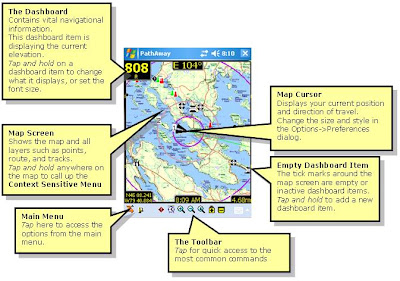
PathAway GPS 5 Is a major improvement over PathAway GPS 4. It sports a new "Finger Touch" user interface, more responsive and faster performance. Also, the dashboard is now transparent enabling you to visualize more of the map without losing the display of important trip information. With the new Trips database structure it is easy to import and export GPX files since all of the data included in the GPX file including Points, Routes, and Tracks, will be contained in the Trips definition. So you can export the Trips as well and all the necessary data will remain together. Also included is a new Elevation and Speed Profile Screen. Great for analyzing the difficulty of a trek, or reviewing performance.
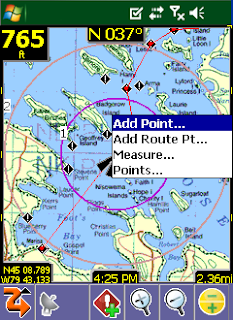
PathAway is all-purpose GPS navigation and mapping software for mobile devices.
PathAway is useful for off-road navigation and mapping activities such as aviation, boating, off-road driving, hiking, cycling, touring, rally racing, motorcycle touring, ballooning, scuba diving, fishing, hunting, paragliding, mountain climbing, ultra-light flying, canoeing, snowmobiling, athletic training, outdoor education, geocaching, mapping/GIS, mining, military training, surveying, site inspection, telematics, field data collection, search and rescue or any application where location is important.
With PathAway you can choose between Standard or Professional Editions.
PathAway Standard and Professional Editions:
* GPS Navigation with most GPS Devices (including Bluetooth)
* Import your own Maps using PathAway Map Manager
* Intelligent Moving Map Display
* Add Personal Points of Interest/Waypoints with notes, photos, and audio
* Record and Follow your Tracks
* Point to Point Routing
* Proximity and off-track Alarms
* Area Calculation and Distance Measurement.
* Onscreen Trip Statistics on a Customizable Dashboard
* Map View, Compass View, GPS Sky View
* Support for Google Earth KML GPX, LOC, or text delimited data
* Transfer Data To and From Garmin, Magellan, and Data Logger GPS Devices
* Map Projections, UTM, OSGB, and Datum support
* Palm OS and Windows Mobile versions
PathAway Professional Edition:
* All of the features of Standard Edition plus new features targeted towards power users and professionals
* Send your Location to other PathAway users or to a central tracking service. Http and SMS support.
* Monitor other remote locations on your handheld.
* Wirelessly download maps from the web on-the-fly. No need to calibrate and install maps beforehand. Includes support for Google maps, Terraserver, and OpenStreepmap.com
* Support for Garmin IMG Vector maps.
* Calculate new Location from relative distance and direction;
* Left/right, high/low directional alarms;
* Pace-keeping features for racing, training, or arrival-time scheduling;
PathAway GPS 5 - Standard Editions
New Features
- Multimedia Points. Add Photos and Sound to captured points. Included support for Camera phones for Photo capture. Click on points and play their sound or display the picture. Proximity indicator shows a thumbnail of the nearest point (if there). Click on the thumbnail for a full view of the picture.
- Track Up Navigation: Automatic or manual Map rotation in 90 degree increments.
- New View Screens. GPS Sky View, Satellite Data View, and Compass View.
- Goto Location: Enter specific location coordinates to position map
- PocketMode Feature : You can now track via your GPS, and save battery life at the same time. Once you enter PocketMode, PathAway turns off the screen (or backlight depending on device), and locks the keys but continues to record GPS data to your track log. If you using a Bluetooth GPS, simply connect the GPS, enter Pocket Mode, and put the handheld in your Pocket! No need to worry about accidentally hitting keys to issue unwanted commands. Use the special key sequence (or power button) to exit Pocket mode and return to the View screen.
- Split Track Here: "Click on a track point and "Split" the track into two at the selected point. Great for dividing up lengthy tracks that only need to be in separate segments.
- Calibrate by 3 or More Known Points: Now you can Calibrate maps that do not have horizontal and vertical longitude and latitude lines, and do not have a known projection. PathAway 4 features new algorithms to accurately calibrate maps by choosing 3 or more known points. Map no longer needs to have perfectly horizontal latitude and vertical longitude lines. Calibration can be done via Map Manager, or on the handheld by selecting the known points on the map.
- Primary and Secondary Position Coordinate Display: Choose two different Position coordinates to display on the dashboard. Now you can show both lat/long and UTM (or any other supported Grid format) at the same time. Or choose a different Datum to display in.
- Optimization for Datums other than WGS84: Previously, there was much overhead when displaying maps and data in different datums. Now there is no perceptible difference in performance across all Datums and Coordinate grids.
- New Coordinate Grids: Quebec-MTM, MGA, GGRS87, Swedish Grid, Irish grid, Israel Grid
- New Datums: RT90, GD94, EGSA87
- Toolbar Hide/Show. Expand your view of the screen by hiding the toolbar. Windows Mobile versions can hide the toolbar, or the top Taskbar to give you the entire screen for viewing.
- Manual And Proximity based Route Point Targeting. Manual means user must select "Advance Route Point" before PathAway will target the next point in sequence. Proximity means you must enter within a proximity of a route point before the next point will be automatically targeted.
- Measure distance between 2 points: Want to know the distance between 2 points on the map? Simply select Measure... from the Popup menu, and click on the 2 points.
- Large size Icon and Text Menu display: Double the size of the icons for better viewing, or enlarge the text on the menus for arms-length viewing, or easier finger selection.
- Coordinate Grid Lines on Map: Show the latitude and longitude lines on the map. Automatically determines best gapping between lines to keep the screen uncluttered.
- Import GPS data from Data Logger NMEA file: Download data logged in your Data Logger GPS, (I.e.. RoyalTek BlueGPS.) and import the NMEA file directly into PathAway.
- Support for SDIO GPS: Now use your SDIO slot as you GPS receiver. Direct support for SDIO GPS devices added. Ie. Stellus StarNet SDIO GPS.
- New Data Import Formats: GPX, LOC Supported via PathAway PC Conversion Tools, or handheld from the new "Import..." option via Database dialogs. Great for GeoCache users.
- Elevation alarms and warnings: Receive audible alerts when you rise above or fall below specified elevations in relation to the track or route you're following.
- GPS fix acquired and lost alarms: Receive audible alerts when a GPS fix is acquired or lost.
- Custom Alarm Sounds: Add your own sound clips to be used for any of the available alarms. Even attach a sound to a specific point to be played as the "in-proximity" sound.
- On-Map Display of Estimated Travel Time. PathAway displays the ETE on the map by showiing rings indicating the time to reach points on the map. By default, ETEs are set in 1,2, 5, 10, 30, and 60 minute intervals. Customizable in the Preferences>Time dialog.
- GPS Connection Retrys: Option to maintain trying to connect to GPS even if communications are temporarily lost.
- Set Speed and distance decimal precision: Now modify the decimal places to show on the screens used for reporting distances. Preferences-System.
- Depth Tracking: Option to record "Depth" (if available) in elevation data field instead of altitude. Preferences-System.
- "Auto Detect" baud rate. Turn on Auto Detect, and system will cycle through baud rates until if begins to receive a valid stream. GPS Configure Dialog
- Elevation Correction: Automatically adjust elevation to correct for SIRF II Elevation error, or set a fixed elevation adjustment to be applied to all elevation data received from GPS.
- Editing text: Added Tap and Hold menu for Undo, Cut, Copy, Paste, Select All
- Top Taskbar Hide/Show: See View > Show Taskbar
PathAway GPS 5 Standard and Professional
* New Transparent Dashboard. See the entire map even with a loaded set of Dashboard items.
* New "Finger Touch" UI. Uses icon based drill down menus. Main navigation screen is always live while the transparent menu options are displayed. This is to allow the user to choose menu options while on the move and still see where they are going.
* Profile View: Elevation and Speed Profile of current Route.
* Increased performance and better responsiveiness- Fast screen refresh with background data processing. No need to wait for screen refreshes.
* Scale Zoom In and Out: More responsive Zoom In and Out. More zoom increment levels.
* Dashboard; Item Hide/Show now just hides the item (doesn't remove it completely, so you can simply "Show" it when you need to)
* Dashboard XXL Font.
* More Dashboard stats like Time/Dist (useful for timing sports and training activities, ie. 5 min per km).
* Trip Management. Keep your Tracks, Points and Routes together for a specific Trip. Especially useful for Importing and Exporting GPX or KML files. Create Trips, Drag and drop Routes, Tracks, Point databases into a Trip file.
* Start New Trip Wizard: Step by step setup of a trip configuration. Select and existing "Trip" to use or create a new one, choose route or track to follow, and setup track logging configuration.
* Favorites Options for "Finger Touch" UI. Can Add any item to Favorites menu.
* Point Info is now Html based. Basic info is implemented now. Richer formats will be added including imported html from GPX files.
* More Compressed Maps: Create 8-bit maps using a customized color palette. Now create highly compressed maps without losing color quality.
* Track and Route Info showing, total distance, time, and area.
* Tracks/Routes/Point DB/Maps - Supports "Multiple Select" for Delete, Move To... commands.
* "Add Point To Track" and "Add Turn To Track" added as options for Hard Keys.
* New Grid Coordinates: MGRS, Swedish SWEREF99TM, Swiss CHRREF95, CH1903,Warschauer.
* Pocket Mode Preferences options. Now there is an option to keep the screen on with the keys locked so you can pull the unit out for a quick progress check.
* Language selectable from Preferences: In the Multilingual Installer, all available languages can be selected from the preferences in the program. The language option is also displayed on first-time startup. Included languages are English, German, Italian, Spanish, French, Czech, Portuguese, Chinese Simplified and Traditional
* Standard Edition gets some features previously only available in the Professional Edition:
o Find Address by Internet Lookup.
o Sync GPS time with device time.
o Time and Distance Radials.
o Record 3D fixes option for accurate tracking
PathAway GPS 5 Professional - Additional Features
In addition to the above features, the following features have been added exclusively for PathAway Professional Edition.
* Direct Garmin IMG (non-routeable) vector map support. Simply place the IMG file in a PathAway registered folder and it will display as an overlay on the raster maps.
* WebMaps: Support for OpenStreetMap.com downloadable seamless maps.

Download to PC Clicks
here
Alternate
here
 RSS Reader
 Twitter


