Latest Updates-> SPB Mobile Shell v.3.5.5 New Release!here          New version Inesoftphone v5.07 English Click here          New SPB Mobile Shell Change SKIN v.4.5 Click here          New Documents To Go v3.0 Click here          HTC Espresso Theme For Mobile Shell here          Spb Mobile Shell v3.5.5 build 10087 latesthere
Showing posts with label photo. Show all posts

Resco Photo Manager Standard and Professional v7.11

[PPC]Resco Photo Manager Standardand Professional v7.11
Requirements: Windows Mobile 5/6.x

Photo Manager is a favorite photo viewing program with features far beyond standards of the classic built-in viewer.

Users gain functions of complete image management in a modern looking and easy to handle application. Intuitive way of work, outrageous effects and many slideshow and edit features move other image viewing programs to the second line.

Features:

Upload to Social networks:
- Facebook, Twitter, Flickr, Picasa supported / view
- Upload image with comment and GPS location

Image formats & technologies
- JPG, PNG, GIF, TIFF, BMP, CFX, PSD, PCX, RAB, PGM, PPM
- RAW, CRW, CR2, RAF, MRW, NEF, ORF, PEF (only Professional Version)
- Fax formats
- Multipage Tiff supported
- 1, 2, 4, 8, 16, 24 & 32 bit formats supported
- Transparency and ALPHA formats supported
- Animated GIFs
- Support of EXIF & IPTC meta tags

Image Browser
- Thumbnail & detailed mode with base image info
- Letter & date navigation bar
- Folder content preview
- Quick image access
- Quick thumbnail loading
- Caching of slowly loaded image thumbnails

Image Viewer
- Rotation , navigation and zoom gestures
- Double tap image to quickly view detail in original size
- GUI animations
- Support of G-sensor

Image Editing
- Image resize (multiple resize supported)
- Image crop
- Set image as Home Screen
- Set image to contact
- Convert image to JPG, PNG and BMP
- Gamma, contrast, brightness and RGB corrections
- Attach image drawings (lines, rectangles, circles, texts)

Image Notes
- Text notes (title, comment)
- GPS location
- Audio notes
- Text notes can be saved into EXIF

Footprint
- Add GPS position to any image and make a diary of your trip
- Locate geo-tagged image on map (using Google Maps)

Slide Show
- Support of attractive transition effects
- Background music during the slide show
- Audio comments during the slide show

Multiple File Operations
- Copy, Move, Rename, Delete
- Send via IrDA, Bluetooth or SMS
- Send to email
- Upload to social networks

Miscellaneous
- Support of album packages
- Different skins available
- Folder previews

Update - Last updated on May 4, 2010, 2010

Photo Manager Standard and Professional has been upgraded to the version 7.11

In this versions we have fixed these problems:
- Black and white pictures displaying was fixed
- Font & Style problems were fixed
- Uploading problems has been solved


Download to PC Clickshere
Alternatehere

VT Contact Picture v.1.1 ppc

[PPC]VT Contact Picture v.1.1
Requirements: WM5-WM6.5


VT Contact Picture finds and allows adding a Picture to Contact from Facebook.

VT Contact Picture finds and allows adding a Picture to Contact from Facebook. It extends Contact menu by adding a new menu item "Add Picture from Facebook". Picture is searched in Facebook Name fields. You can adjust search criteria to match the name that could be found for this person.

While downloading pictures, you can browse them, view full-screen preview, and choose to add to your contact.

VT Contact Picture uses your mobile internet connection, so normal internet carrier charges apply.

It is fun to set photos for all your existing contacts without having to take photos – just find them on-line. This is an easy and fast way to get a persons picture attached to your Contact.

Here are some key features of "VT Contact Picture (Pocket PC)":

· Menu in Contact: Add Picture from Facebook
· Search pictures by Contact Name
· Modify search criteria
· Browse pictures while downloading others
· Full-screen picture preview
· Add picture to Contact
· Be recognized by recognizing others


Download to PC Clickshere
Alternatehere

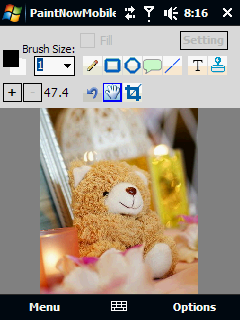
Paint Now Mobile v1.3.27.1353 ppc

[PPC]Paint Now Mobile v1.3.27.1353
Requirements: PocketPC 2003(SE), WM5, WM6

Edit/Paint your image on the way! The application allows you to do some basic image editing/painting comfortably on your mobile!

Imagine that you take some photos using your phone and want to upload them right away to your facebook. However You might want to edit/draw them before. In that case, this app might help!

Current features:
- Drawing:
o Pencil.
o Rectangle.
o Circle.
o Callout.
o Text Typing.
o Line.
o Eye dropper.
o Stample tool - e.g. for watermarking your image, Stamping icons... etc.
- Image Editing
:
o Resize.
o Crop.
o Convert to B&W.
o Convert to Sepia.
o Rotate Left & Right.
o Adjust: Brightness, Contrast, Saturation.
o Filter: Sharpen.
o File-type Conversion.
o Undo/Redo.
- Supported File Type:
o JPG (By saving JPEG image, you have a possibility to limit image size - good for preparing images for uploading to some WebSite that has file size limitation)..
o PNG.
o BMP.

Know Restriction:
- Image Editing is a memory-hungry process. You might not be able to work well with large image with very high resolution.
- In case of not enough memory, undo/redo functionality might not work well.
- Landscape mode is not supported.

If you like this project, please consider donate to the developer.

Update Description:
v1.3.27.1353:
- Removed the donate dialog when application starts.

v1.3.26.1338:
- Replace the right menu "Up"with "Cancel" in Open/Save file dialog for better meaning.
- Brightness.
- Contrast.
- Fixed some bugs.
- Added Redo functionality.
- More undo steps possible (depending on memory and image size), maximum 5 steps.

v1.2.19.1251:
- Enhanced Open/Save file dialog.
- Sharpen.
- Saturation.
- Added an option not to use COM object to open/save file.
- Added % progress indicator for long run task.
- Added possibility to abort long run task.

v1.1.009.2236:
- Eye-Dropper tool.
- Enable easier Fore-/Back color switching.
- Fixed Pencil Tool lagging problem.
- Rearranged the tool buttons.

v1.0.3.1921:
- Added line tool.
- Change Max Zoom to 800%.
- Added an option to disable Anti-Alias when displaying zoomed image.


Download to PC Clickshere
Alternatehere

HandyPaint v1.50.3014 ppc

[PPC]HandyPaint v1.50.3014
Requirements: WM5-WM6.5

HandyPaint is a powerful yet easy to usedrawing tool for your mobile device.

You can use it to create your own paintings, oredit pictures taken from your device's camera, even you can take a screenshot for editing. HandyPaint provides you pleasant and excellent drawing performance that better than any product in the industry.
Features:
*.Supports anti-aliasing drawing. Makes paint look more comfortable.
*.Supports 30+ tools for drawing, such as pencil, line, curve, rect, round rect, ellipse, polygon, and text, flood fill, color picker, eraser...
*.Support for load/save image files in BMP,JPG,GIF and PNG formats.
*.Support for save paint as Gray bitmap file.
*.Unlimited Undo/Redo.
*.12 levels of pen and line sizes.
*.8 levels of pen hardness.
*.Text styles - choose among normal, bold, italic, underline and strikeout fonts.
*.Resizable and moveable toolbar. Also supports translucent and auto hide for toolbar.
*.True color of color selection.
*.Support for move canvas.
*.Image sizing and stretching.
*.Support for take a picture by camera for editing.
*.Support for take a screenshot for editing.
*.Support for save paint as HandyPaint Format (.hpf) file for editing at next time.
*.Support for send paint to your friend.
*.Auto arrange UI elements at switching screen between landscape view and portrait view.
What's new in version 1.5
- Spray brush added.
- HandyPaint Gallery added. So user can upload paintings onto it, and share them with others on Internet.
- Toolbar improved. Now you can move toolbar to anywhere on the screen more easily.
- Bug fixes.


Download to PC Clickshere
Alternatehere

Face Reader. v1.0 full windows phone 6.5

[PPC]Face Reader. v1.0 full windows phone 6.5
Requirements: WM5 - WM6.5.X, QVGA, VGA, WQVGA, WVGA


FaceReader is the world''s most sophisticated and detailed Face Reading application .

The app is based on and supported by the Profiler1.com engine which also offers one the opportunity to experience our website. FaceReader uses a special server algorithm and face recognition system enabling anyone to read any human face and gain a comprehensive report. Such a report covers a variety of personality traits and yet is presented in a humorous style.


You can take a photograph of yourself , your spouse, friends, siblings, parents or any others and figure out their behavioral and character traits. Thirteen years of statistical research should be incentive enough to get one and all to commence using FaceReader you won''t believe how much truth is revealed by the human face! It should be noted that similar systems are used in the field of intelligence.

Use it at meetings, parties, at home and even to charm your next date! Just take a photograph or choose from the gallery and our special system will do the rest in a couple of seconds. FaceReader is exploited by people throughout the world speaking five different languages. You can set up your own language: English, Spanish, French , German or Italian.


Compatibility:
Pocket PC Windows Mobile 6.5
Pocket PC Windows Mobile 6.1
Pocket PC WVGA resolution (fullscreen 800x480 480x800)
Pocket PC VGA resolution (fullscreen 640x480)

Please note: upon installing the game, after installing, click on the face Reader icon, face Reader requires an internet connection to download graphics content and user interface.

Please note: this is not a application, this is a fully playable game with realistic graphics.


Download to PC Clickshere
Alternatehere

BGSwitchPPC wallpaper changer for windows mobile

BGSwitchPPC - Automatic wallpaper changer for windows mobile
Requirements: Any PPC running WM6/6.1/6.5

Do you sometime feel tired of changing your wallpapers manually. Now just leave that work to a simple friendly application for your windows mobile knows as BGSwitchPPC, which allows you to define folders for your respective wallpaper resolution landscape/portrait. Nice isn't it! Check out how to do that.

Current Features
Random Background Selection
Supports any resolution device
Different Image For Portrait/Landscape mode
Supports Different Directories To Select Portrait/Landscape Iamge From
Preview Backgrounds In The Config Util
Scheduling Support
Timer Support
New Background After Hard Reset Option

Download and copy the exe from this zip file to your storage card or your main memory.

Download to PC Clickshere
Alternatehere

Chili Photo Slide v.2.0 ppc

Chili Photo Slide v.2.0 windows phone
Requirements: WM5-WM6.5

Chili photo slide application is created in order to touch and slide your photo easily. Then you can be simple and easy to view your photo and provides intuitive features which control all of your photo with your fingertips.


■Touch and slide your photo easily
■Feel so cool! When you slide your photo with your finger
■Look and feel features
■Easy to use
■No need for stylus
■View images in My Picture folder
■Add your own Album
■Fast and smooth slide images with Finger-Touch System
■Quick loading time and display on the Thumbnail view
■Full Screen Display
■Support a Slide Show
■View images in BMP, GIF, PNG and JPEG format
■Zoom images
■Rotate images
■Send images via MMS and also E-mail
■Set your favorite images to Contacts and Wallpaper
■Import entire images from folder at once
■Support full path (file open, add)
■Support the CF card and SD card (useful for your Digital Camera)
■Look and feel User Interface

This application is able to view images in BMP, GIF, PNG and JPEG format. With easy-to-use and elegant User Interface, you will enjoy your impressed images at everywhere and every time with your Pocket PC buddy

Download to PC Clickshere
Alternatehere

Resco File Explorer 2010 v.8.00

Resco File Explorer 2010 v.8.00
Requirements: WM2003-6.5
Overview: Resco Explorer - Totally Touchable File Manager

Description
Full touch optimization
Quick and easy to use. Navigate through your files easily using your finger. Toolbar optimized for using your thumb for quick access.

Thumbnails View Mode
The new view mode displays previews of images. It becomes handy (improves the navigation) while seeking in folders with many image files.
The new Explorer can utilize tools and strengths of Resco Photo Manager. If users have both of these programs installed on a device, they will sense that the thumbnail loading is faster as well as the fact that it supports all the photo manager image types.

Upload to Social Network
The program is now able to upload image files to the most popular social networks including the largest web image database: Facebook, Flickr, Twitter, Picasa, MySpace and Photobucket.

Today Plugin
Today plug-in gets new shape and becomes totally customizable — add or remove phone tools, applications or documents. The eventual size of the plug-in, therefore, depends only on your choices.
Why is it useful to install the Resco Today Plugin ?
* Check your battery status and the free storage/memory directly on the Today screen.
* Launch your favorite applications and documents with a single tap.
* Browse the storage card with a single tap.
* Manage running applications with Task Manager
* Get the detailed storage properties.
* Use arrows for smart movement
* Additional skins ...

Task Manager
Avoid the complex process of managing tasks and apps in your PPC. Use the elegant, smooth and touch friendly interface of new Task manager. Easy to use, always at your service right on the home screen with catching graphics — that is the new Task manager from Resco.

Letter bar navigation
The side letter navigation bar lets you access your files faster
Features the letter preview of the files you would like to access with the specific files showing up instantly

Virtual Folders for all documents
All file types associated with what you are looking for can be found in these folders without the need to look for them in all your folders on the device or your storage card.
Instead they are all displayed in these virtual folders from where they can be retrieved easily anytime you need them.
Includes:

* Documents
* Encrypted Files
* Images
* Music
* Videos

You also have the option to create your own virtual folder with the file extensions which you plan to use frequently
Very useful when looking for files of the same type

The Quick Search Function
Using the keyboard, instantly search for files you need by typing in the starting letters of the file

The File Manager
The File Manager is the HEART of the Explorer.
It is stable and efficient and it provides the most comfortable way for file operations such as copying, moving, deleting, renaming, etc., including speed measuring.
It is great when you need to quickly search for files or file content. It speeds-up your work by using the Favorites folders. The system info keeps you informed about your system resources usage at all times.
With File Types Highlighting you will never oversee important file type.
Customizable keyboard shortcuts ensure you can run favorite features by pressing a single button.
Customizable startup folder ensures you will immediately start in a folder you really want to.

Recycle Bin
Resco Explorer now moves deleted files into a virtual folder "Recycle Bin" instead of immediate deletion.
If the file was deleted accidentally, it is now possible to restore it safely from the Recycle Bin folder.
Recycle Bin takes at most 10% of each storage. It is possible to choose the bigger or smaller space
for recycled files or disable the Recycle Bin completely.

Strong File Encryption
You can use the Enhanced Cryptographic Provider with strong algorithms such as RC2-128, DES-56, 3DES TWO KEY-112, 3DES-168.
We did our best to make the en/decryption process familiar looking and easy to use.
Additionally, you can also install a Windows 95/98/ME/2000/XP/Vista shell extension to use the encryption/decryption process on desktop PCs.

Archive files (ZIP, RAR)
ZIP Compression can be used to increase the storage space of any storage device.
Use of this handy tool is the simplest and cheapest way to save significant amounts of storage space.
The used ZIP algorithm is PC compatible, so you can extract archives created on a desktop PC and vice-versa.
Decompression of RAR archives included.

The built-in Viewer
The built-in Viewer can be used to view files in TXT, BIN or HEX format, as well as JPEG, GIF, BMP and PNG graphic formats.
The built-in viewer implements a very comfortable text search function.
Viewing files has never been so easy.
You can use the built-in viewer also to view encrypted files (decryption in memory)

The Network Browser
The Network Browser let's you discover and take advantage of the wired-up world directly from your device.
Simply map the shared network folders and work with them as easily as with the local ones.
Various settings allow you to set your network drive in the exact way as you desire.

The Registry Editor
The Registry Editor is for power users only.
It allows you to export, import, view or modify the registry keys.
The interface is very simple and very powerful at the same time.

The FTP Explorer
FTP Explorer gives the possibility to browse the FTP server's content directly in your Resco Explorer window. It adds the root below the "My Device" and the user is able to copy/move/delete/rename files the same way as if they were the local files.

What is new:
* Image Upload to Facebook, Flickr, Twitter, Picasa, and Photobucket — the program is now able to upload image files to the most popular social networks including the largest web image database — Flickr.
* Thumbnails View Mode — The new view mode displays previews of images. It becomes handy (improves the navigation) while seeking in folders with many image files.
* Interaction with Resco Photo Manager — The new Explorer can utilize tools and strengths of Resco Photo Manager. If users have both of these programs installed on a device, they will sense that the thumbnail loading is faster as well as the fact that it supports all the photo manager image types.
* Totally Customizable Today Plug-in — Today plug-in gets new shape and becomes totally customizable — add or remove phone tools, applications or documents. The eventual size of the plug-in, therefore, depends only on your choices.
* Improved Task Manager - Task Manager has a new sleek skin and acts as a standalone application, so you can add it as a shortcut or map it to the hardware button.

Download to PC Clickshere


Alternatehere

Eye Copy v1.0 ppc

Eye Copy v1.0 ppc

Need a photo of that document at the library? Need to scan in your receipts and send them in for reimbursement? Want to combine all your vacation photos into a single PDF and send them to family, right from your phone? Eye Copy is for you!


An easy and fast interface makes it simple to snap documents and photos and send them off, right from your phone, whenever it''s convenient for YOU!

Business Professionals: Scan in your receipts and send them to accounts payable for quicker reimbursement.

Students: Save money on copies and just take snapshots of those notes and email them to your classmates or to yourself.

Realtors: Take photos of homes and send them quickly to your clients.

Brought to you by The Auri Group, makers of many fine Windows Mobile products, including I Left My Phone At Home - rated a Must Have App by Fuze Mobility - and Mobliza.

Download to PC Clickshere

SPB Flash Cards v1.0.0.Build.553 pocket pc

SPB Flash Cards v1.0.0.Build.553


Traditional flash cards for learning foreign languages enhanced with smartphone technologies like photos, native speakers' dubbing, learning progress visualization, smart adaptive algorithm, and detailed statistics.

Traditional flash cards for learning foreign languages enhanced with smartphone technologies like photos, native speakers' dubbing, learning progress visualization, smart adaptive algorithm, and detailed statistics. The application helps you to skip the stage of translating a word into your mother tongue first, but memorizing a direct match of a subject and a foreign word instead.

Here are some key features of "SPB Flash Cards English (Pocket PC)":

Cards:
· 1000+ words
· 65+ categories
· Explicit photos for all words
· Sliding and rotating finger-friendly cards
· Voice records by native speakers
· Create your own cards on SPB website

1000+ Words:
· People, different animals, birds, insects
· Clothes, shoes, furniture, tools
· Places, scenery, street, house
· Office, computer, electronics, school
· Fruits, vegetables, trees, food, drinks
· Art, books, casino, fairy tales
· Car, sports, weapon, jewelry
· ... and many others

Languages:
· English
· German
· Spanish
· Italian
· French
· Portuguese
· Dutch
· Chinese (Simplified)
· Japanese
· Korean
· Swedish
· Hebrew
· Czech

Learning Process:
· Expand your vocabulary
· 5 different learning modes
· Track your learning progress with detailed statistics
· Smart algorithm for adapting the learning process
· 3 dimensions of memorizing: visual, audible and textual

Download to PC Clickshere


Alternatehere

Resco Photo Manager v7.01 pocket pc

Resco Photo Manager v7.01

 Photo Manager is a favorite photo viewing program with features far beyond standards of the classic built-in viewer.


Users gain functions of complete image management in a modern looking and easy to handle application. Intuitive way of work, outrageous effects and many slideshow and edit features move other image viewing programs to the second line.


Features:

Upload to Social networks:
* Facebook, Twitter, Flickr, Picasa supported / view
* Upload image with comment and GPS location

Image formats & technologies
* JPG, PNG, GIF, TIFF, BMP, CFX, PSD, PCX, RAB, PGM, PPM
* RAW, CRW, CR2, RAF, MRW, NEF, ORF, PEF (only Professional Version)
* Fax formats
* Multipage Tiff supported
* 1, 2, 4, 8, 16, 24 & 32 bit formats supported
* Transparency and ALPHA formats supported
* Animated GIFs
* Support of EXIF & IPTC meta tags

Image Browser
* Thumbnail & detailed mode with base image info
* Letter & date navigation bar
* Folder content preview
* Quick image access
* Quick thumbnail loading
* Caching of slowly loaded image thumbnails

Image Viewer
* Rotation , navigation and zoom gestures
* Double tap image to quickly view detail in original size
* GUI animations
* Support of G-sensor

Image Editing
* Image resize (multiple resize supported)
* Image crop
* Set image as Home Screen
* Set image to contact
* Convert image to JPG, PNG and BMP
* Gamma, contrast, brightness and RGB corrections
* Attach image drawings (lines, rectangles, circles, texts)

Image Notes
* Text notes (title, comment)
* GPS location
* Audio notes
* Text notes can be saved into EXIF

Footprint
* Add GPS position to any image and make a diary of your trip
* Locate geo-tagged image on map (using Google Maps)

Slide Show
* Support of attractive transition effects
* Background music during the slide show
* Audio comments during the slide show

Multiple File Operations
* Copy, Move, Rename, Delete
* Send via IrDA, Bluetooth or SMS
* Send to email
* Upload to social networks

Miscellaneous
* Support of album packages
* Different skins available
* Folder previews

Update - Last updated on 04.12.09
# Zoom function improved
# Saving larger images optimised
# Browser displays folders and albums
# Use Flickr to publish your images online!

Download to PC Clickshere


Alternatehere

Wizcode PhotoCopy pocket pc

Wizcode PhotoCopy v1.01.003

Turn your mobile device into a fully featured photo copy machine, scanner and fax machine!


Turn your mobile device into a fully featured photo copy machine, scanner and fax machine. Use the built-in camera to photograph (scan) paper documents on the go or take pictures and have them converted to compact PDF files with a single click of the stylus. In addition, you can also load images from your storage card and combine them with a scanned document, or combine multiple documents/images into a single PDF file. Share scanned documents with your contacts instantly by emailing them from within the application. PDF files can be saved to your mobile device for digital archiving or backup.

Use Wizcode PhotoCopy Mobile to:

* Archive and share documents on the go
* Photocopy text, magazine pages or other printed materials
* Scan business cards, recipes, meeting memos or notes
* Create PDF photo albums

Here are some key features of "PhotoCopy Mobile":
· Scan materials using the built-in camera
· Import images from storage card or device
· Change the order of the pages
· Insert blank pages
· View, zoom, rotate or crop images
· Delete images
· Create high quality PDF files from images
· Save PDF files to your device
· View PDF files with your default PDF application
· Send PDF files by email and share them with other people

Download to PC Clickshere


Alternate filehere

Vito Technology Eye Photo v1.0 pocket pc

Vito Technology Eye Photo v1.0.XScale.WM03.WM05


EyePhoto organizes all your photos into photo albums. Having started the program you face all folders containing jpeg pictures in the main memory and on a storage card. Upon opening a folder you are presented with photo tiles displayed in one finger-scrollable window. Everything is done for your convenience. The preview window with photo tiles can help you find the photo you need just in a moment.

Tapping a photo tile opens a full screen photo. Now you can slide the screen with your finer to flip through the photos just like with a real photo album. Zooming in and out can be done by double tapping the image.

Tapping the photo only once will bring forward upper menu which shows the number of photos, the back arrow to go back to the list with tiles and the button for changing the view mode: landscape or portrait. The photos can be moved aflat or upright depending on the view mode.

Download Clickshere


Alternate phonehere

Resco Photo Viewer 7.00 Beta

Photo Viewer 7.00 Beta

Requirements: WM5-WM6.1
Overview: We are glad to announce you, that after the Alpha stage we are releasing the Beta Versions of the Resco Photo Viewer, that implements all the functionality that makes the Photo Viewer complet. We hope you will help us make the new version of the Photo Viewer the best viewer on the market and that you will enjoy it.


What is new from the last version 6.33:

* The application is completely touch friendly
* In the folder view you are able to see three thumbnails of the pictures in the folder
* You can view the GPS position from the picture in google maps or using your browser
* You can add your actual GPS position to a picture
* Send to SMS, MMS, E-mail
* Upload to Flickr, Facebook, Picassa, Twitter
* Select album where to upload, add comment and GPS position
* Edit Mode in view
* Contrast and Gamma adjusment
* Adding Notes from a dialog
* View Notes and GPS from Exif (or add to Exif if not present)

Options dialog:

* Start In Folder
* Auto-Hide Scroller
* Auto-Hide Tools
* Document Mode (for comics and fax reading)
* Send\Upload Settings (preddefined send size and other settings ...)
* Associate All Formats
* View Mode (Details, Icons, Icons + Names, Icons + Details)
* Show/Hile Notes option
* Show Next/Prev Buttons

Download to PC clickshere

vsPainter v1.8 Pocket PC Apps

[PPC]vsPainter v1.8 Pocket PC Apps

Vspainter features advanced tools to help you create your digital masterpieces.

Pocket PC Apps
For any designer, artist, creator of video games, cartoonist, illustrator, blogger etc.. VsPainter help your daily creativity, anywhere at any time of day. Take your mobile and draw digitally by using many creation tools. Drawing on the screen is more pleasant than using a mouse or a standard graphic tablet.


Features:
* Instant Creativity
* Natural and intuitive
* More productivity
* Advanced Drawing Tools
* Use of several pages
* Auto Load/Save

Requirements:
* Windows Mobile 5/6.x
* 6 MB of available RAM
* 6 MB of storage available (Possibility to install the software on external SD card)

Languages:
English and French


Download clickshere

SPB Imageer pocket pc

Spb Imageer is a very powerful imaging engine designed specifically to streamline common processes that Pocket PC users perform with digital photos. Equipped with an incredibly rich set of features, Spb Imageer will make your work with images fast, comfortable and joyful. Even if you edit an 11 megapixels photo!

PocketPC Apps


Features

  • One-click slideshow with smooth transitions
  • Multiple thumbnail options
  • Picture editing (red-eye, brightness, contrast, and more)
  • Storage card notification with common tasks
  • Batch optimizing of photos
  • Web publishing (Flickr, Fotki.com, and more)
  • Album creation and sharing
  • Rich picture notes (text, drawing, and sound)
  • Powerful screenshot tool

Image list. You can sort images in this list by name, date, size, and type by selecting a Sort by method from the top right corner of the screen (labeled Name by default).
You may list the contents of a certain folder by selecting it from the folder list in the top left corner. You can open any folder on your device, including those on your flash disk, or a storage card (cards). To open a certain folder tap Show (labeled My Pictures by default) and explore your device.
On this screenshot you can see the Thumbnail mode of the image list. In thumbnail mode you can get the visual perception of every image in this list. You can select the number of thumbnails to be displayed in a row. This screenshots shows a three in a row mode.


Detailed Thumbnails. In the detailed thumbnail mode you can see thumbnails and the information on the image files: name, time and date of creation; size in bytes and size in pixels, along with the ability to quickly open the image properties dialog.

To switch between thumbnails and detailed thumbnails modes, tap the File List Mode button in the toolbar.


Thumbnails
.

To make Spb Imageer search for images in all subfolders of a currently chosen folder, select Include Subfolders from the thumbnails menu.


Thumbnail Context Menu. You can select a picture or a group of pictures and perform different actions with these pictures, such as:
  • Delete
  • Rename
  • Copy/Cut/Paste
  • Edit
  • Add/edit picture notes
  • Create an album
  • Optimize and save to folder
  • Publish to Web
  • Set as Today wallpaper
  • Beam
  • etc
Other actions like view slideshow and create new folder are available in the View and Tools menus.

and plenty more..

Download to PC clickshere (cab file ) 1.4mb

Resco Utility Package

Resco Utility Package v6.57

Overview:

The absolute best File Explorer available for PPC, and the Photo Viewer is full-featured, fast, and easy to use. A Keyboard Pro comes for free in the pack.


Photo Viewer 2007:

Turn your pocket pc into a Digital Photo Album. Resco Picture Viewer has ability to quickly display images of file formats: RAB, BMP, 2BP, JPG, JPE, JPEG, GIF, PCX, PCD, TIF, TIFF.
Action button, or stylus manipulation, zoom, rotation, slide show and many other fantastic features make this product #1 in its field.

Explorer 2008:

This is a powerful file management utility for your Pocket PC. It implements all standard features such as file/folder manipulation. Thus, you can copy, move or delete files, create folders, run programs with arguments, and search for files or folders.

File Explorer 2005 is complex solution of the next modules:

* Strong File Encryption
* ZIP Compression
* The File Manager
* The built-in viewer
* The Network Browser
* The Registry Editor

Keyboard Pro:

Do you think your Pocket PC keyboard could be smarter and more efficient? Does it have a calculator, extended keyboard, macro definer ...

Features:

* Skins
* National keyboard layouts
* Gestures
* Auto-repeat
* Three numeric layouts including Calculator
* Frequently used phrases
* Custom keyboard layout
* VGA resolution suport

via offical link
via link

Search This Blog

Related Posts with Thumbnails
Exemptions clause : To visitors,every posts in this blogs are personal recommendations and introductions to downloads and applications are for trial only.You are strongly encouraged to buy the originals from suppliers and manufacturers.