Latest Updates-> SPB Mobile Shell v.3.5.5 New Release!here          New version Inesoftphone v5.07 English Click here          New SPB Mobile Shell Change SKIN v.4.5 Click here          New Documents To Go v3.0 Click here          HTC Espresso Theme For Mobile Shell here          Spb Mobile Shell v3.5.5 build 10087 latesthere

Spb Diary v2.6.0

Spb Diary v2.6.0.Build.4019

Spb Diary is a feature-rich Today plug-in for your Calendar, Tasks, Contacts, Notes and Messages. It enhances Pocket Outlook by gathering all of your PIM information in one place. With Spb Diary, the Today screen will soon become your favorite since you will need to leave it less and less.


Features:
* Today plug-in for PIM data with tabs
* Calendar, Tasks, Contacts, Notes, Messages, Birthdays and Special events
* Calendar tab
* Tasks tab
* Contacts tab with photos
* Notes tab — notes and documents
* Messaging tab — emails & SMS
* Special Events tab — Birthdays and more
* Custom tab
* One hand navigation

Spb Diary 2.6.0 is now available with the following fixes:
- "shifted birthdays/anniversaries" problem if selected period in the Calendar tab overlaps 1 Jan;
- improved 320x320 screen resolution support (Palm Treo Pro, Samsung Saga);
- improved 240x400 screen resolution support (Samsung Omnia);
- problem with disappearing upper toolbar on some devices (Samsung Omnia, HTC Touch Pro, HTC Mogul);
- tasks' "Private" status is now considered as "Confidential";
- if integrated with Spb Pocket Plus, Spb Diary now behaves the same way as if integrated with Spb Mobile Shell;
- on WM6.1 devices with the "threaded SMS" feature enabled the "Reply" and "Forward" actions aren't available in the message preview;
- problem with cut off icons selection in the "Options" applet on HTC Touch HD;
- problem with a contact's phones drop-down on HTC Touch HD.

Surely fix for drop-down menus on HTC Touch HD is included in this version.

download via file

Spb Phone Suite v1.3.1

Spb Phone Suite v1.3.1.Build.1658.Beta

Spb Phone Suite is a collection of useful tools for Windows Mobile Pocket PCs and smartphones with integrated telephone and Touchscreen. The program covers functions like profile, call filtering, messages about missed calls, decline and answer with SMS, and much more!


Functions:
# Enter and manage a profile
# Today Screen Plugin
# Messages about missed calls
# Messages about unread SMS
# Call filtering
# Automatic decline and answer with SMS
# Quick select by image
# Call history with images
# Wireless Manager
# Automatic profile
# Wireless settings in profile

What's new in this beta:
+ settings backup/restore
+ new arrows in call history

download via file

Spb Pocket Plus v4.1.0

Spb Pocket Plus v4.1.0.Build.6681

Spb Pocket Plus offers numerous helpful functions in this product package to improve the functionality of your windows mobile device.


Today Screen Plug-In:
# Registry
# Battery
# Backlight
# Memory status
# Drag and Drop

File Explorer:
# ZIP compression
# Encryption
# 'Up one level' switch
# Format memory card
# File properties

Close Button:
# 'X' really closes programs
# Task-Manager

Pocket Internet Explorer:
# Several browser windows
# Full screen mode
# Save
# Show source code

Buttons:
# Alt-Tab
# Buttons for changing backlighting
# Keyboard navigation in Today Screen

Safe Mode:
# Start the device in Safe Mode to test problematic processes

More:
# Task bar with battery status
# Improved Windows Mobile Pocket PC Themes
# Plug-Ins

For other spb softwares click here

download via file

SPB Wallet v2.0.0

SPB Wallet v2.0.0.Build.11247


Strong Security:
Spb Wallet protects your data using the powerful AES encryption. To access the wallet you should enter the password.
- Strong 256 bit AES encryption
- Logon panel protects against key loggers
- Three password strength levels
- Password hint
- Automatic wallet locking
- Automatic clipboard cleanup
- Special engine to protect from 'phishing' attacks

Mobile:
- Finger-friendly user interface with smart scrolling, gestures and animation effects
- Auto fill for user name and password in Pocket Internet Explorer
- Smart tags to call/SMS/email/etc
- Quick search
- Password generator

Different View Modes:
Cards are stored in folders with any hierarchy you want to have.
- Folders and sub-folders
- Small and large icons
- Tree view
- Most used card view
- Unlimited number of cards

Card View:
You can customize the card view and include as many different fields as you want. A lot of actions can be done without leaving the card view. Smart card fields support:
- Dialing phone numbers
- Sending SMS
- Opening URLs
- Copying data to clipboard
- Password and PIN modes
- Full one-hand navigation

Desktop Version:
The Spb Wallet installation package includes the desktop version with the same and even more powerful functionality:
- Easy to use desktop interface
- Full feature-rich desktop PC wallet
- Toolbars for Internet Explorer and FireFox
- Windows 2000/XP/Vista support
- Multiple wallet support
- Migration wizard from eWallet, FlexWallet, CodeWallet, SplashId, HandySafe and CSV
- Sync with mobile device, file share and Google mailbox
- User name and password auto fill for websites in Firefox and Internet Explorer
- Drag-and-drop for card fields into other applications
- Quick search
- Password generator

Synchronization:
Of course, wallets on your Pocket PC and the desktop are synchronizable. You don't need to worry that you must make changes on both wallets. It will all be done automatically.
- Sync between desktop and Pocket PC
- Item level sync
- ActiveSync plug-in
- Automatic and manual sync
- Multiple desktops to multiple devices

Customization
You can customize Spb Wallet for your needs.
- Add/edit fields
- Add/edit templates
- 7,000+ most popular card templates
- You can order a new template absolutely FREE
- Search templates by country, card type and keywords
- Visual card design editor
- Custom icons and backgrounds
- Large clipart gallery

Spb Wallet — Be Secure!
With Spb Wallet you will be sure that all your sensitive data on both your Pocket PC and the desktop is always safe, synchronized and ready to use!

For other spb softwares click here

download via file

Spb Wireless Monitor v3.0.1

Spb Wireless Monitor v3.0.1 Build 515

Monitor your GPRS or 3g data !

Spb Wireless Monitor is a complete solution for measuring data traffic via all types of connections and calculating network usage costs according to your data plan.


Spb Wireless Monitor is a complete solution for measuring data traffic via all types of connections and calculating network usage costs according to your data plan.

Spb Wireless Monitor Features:
* Per-application traffic and cost reports
* Warnings when exceeding spending limits
* Export to HTML and CSV
* 440+ pre-defined service plans
* Today screen plug-in

Version 3.0.1 (Dec 11, 2008):
* Connection status applet added
* Support for bluetooth connections added
* Bug fixes

For other spb products click here


download via file

Speereo Voice Translator

Speereo Voice Translator v4.5

The Speereo Voice Translator is an innovative phrasebook that provides translation of around 4,000 commonly used phrases.


The Speereo Voice Translator is an innovative phrasebook that provides translation of around 4,000 commonly used phrases (including some idioms and slang) including business, technical, medical and legal terms. These phrases are arranged in 18 main categories and 87 sub-categories - subjects include Travel, City, Food, Shopping, Health and Entertainment.

Speereo Voice Translator supports additional services: Weather Forecast, Currency Calculator, World Time, City Events which are extremely necessary for the travelers.

To view other types of dictionary click here


download via file

Panoramic Calc Pro

Panoramic Calc Pro v2.7.6

Requirements: PPC WM5, WM6
Overview: Panoramic Calc Pro offers more power, more features and the most accuracy than any other mobile calculator.


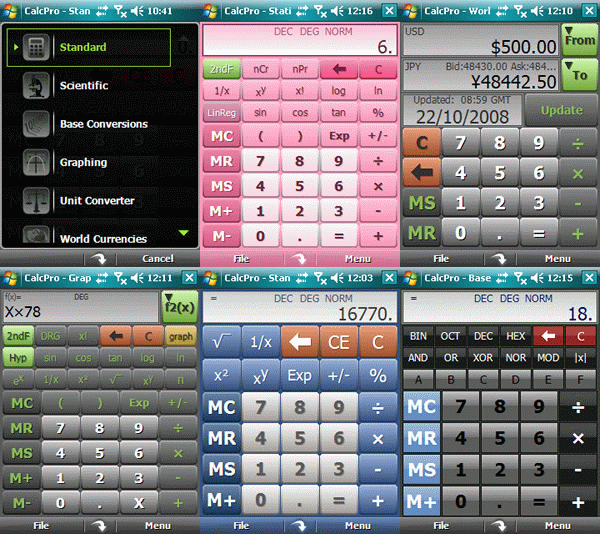
Panoramic Calc Pro offers more power, more features and the most accuracy than any other mobile calculator. With 10 powerful calculators and 10 additional Financial calculators, Calc Pro is by far the top choice to replace your default windows mobile calculator. With five calculator modes, five display options, and five skins, Calc Pro works the way You want. You can use Panoramic Calc Pro to perform any of the standard or advanced operations for which you would normally use a handheld calculator.

* Ten calculators included for uncluttered and efficient performance: Standard, Scientific, Base Conversions, Graphing, Unit Converter, World Currencies, Date & Time (Touch Screen Only), Constants, Financial, and Statistics
* The Financial Calculator contains 10 powerful calculator worksheets to help solve common financial problems
* Five (5) display options: normal, fractions, scientific, engineering and fixed (2-10 decimal places)
* Five (5) calculator modes: simple, algebraic, direct algebraic, expression and RPN
* Copy and Paste functionality allows transfer of results to other programs, such as Excel and Word
* Option for use of regional settings to format onscreen answers
* Open and Saving of CSV files for both regression worksheets
* Easy to use menu systems for quick and intuitive navigation
* Record Tape option outputs a text record of all your calculations so you can review later
* Quick Toggle button to return to the previous calculator
* Five (5) custom skins
* Finger friendly buttons and menus for touch screen devices
* Simple to use - most options are available just by tapping the display (Touch Screen).
* "Smart Input" technology prevents you from entering invalid expressions and avoids errors

Change log
* A small bug was spotted when entering constants in RPN mode, it would add the previous value to stack twice - that has now been fixed.
* Two new conversions have been added to the Torque Unit converter "km cm" and "g cm".
* And a bug has been fixed that corrects some currency symbols not showing up in the Currency Converter on traditional Chinese devices.

* Calc Pro has been updated to 2.7.5 - this is a very minor update. It corrects the display bug when entering 0s after a decimal (they weren't showing up in previous versions). Please note, this bug only affected the display and not the accuracy of Calc Pro.

For other types of calculator click here


download via file here

Festinger Software Historia

  • Festinger Software Historia v3.1.1

This program will give you many advantages over the built in call history of windows mobile.

  • Have you ever wanted to filter a number in your call log?
  • Have you ever wanted to see more numbers on each screen ?
  • Have you ever needed to view the details of each call without having to tap on each number ?
  • Have you tried to copy a number to the calendar or to a note and found out it's impossible to copy a number from the call log ?
  • Do you get many incoming calls from customers and want to see when you talked with each in the past ?
  • Do you have missed calls from unknown callers and want to see if you talked with them before ?
  • Do you want to see what are the longest calls you make, so you can control your expenses better ?
  • Do you want to backup your calls and export them to excel?
  • Do you want to be able to have more than 300 calls in your call log?
  • Do you want to see the current price of your calls and older bills? (Historia 3)

If you answered yes to one or more questions, then you must have Historia.

Features

  • Detailed information on each call , shown nicely in a table.
  • Many lines of calls per screen depending on the size of font you choose in the application settings.
  • Calls are saved in a CSV file in My documents folder. you can open it with excel in your Computer, and work on the data as you wish.
  • Colors, each type of call is colored differently: Red - Incoming, Green - Outgoing, Yellow - Missed.
  • Filtering option, by type of call or by number.
  • Calling a number from within Historia.
  • Sending SMS.
  • Copying a number to the clipboard. (Historia 3).
  • Saving a number to the contacts.
  • Deleting calls.
  • Specifying the limit of number of calls which will be saved to the csv file up to 100,000 calls.
  • Automatic updating of the call list when new calls are made.
  • Column width can be changed by the user and the settings is saved.
  • Changing the font type and size.
  • Price Calculation.
download via file

SBSH.PhoneWeaver

SBSH.PhoneWeaver.v1.4.1

on your today plugin now !!!


PhoneWeaver Software for Windows Mobile Pocket PC
Define smart profiles that are activated manually or automatically based on the time, agenda or phone state. Using profiles, control the state of your phone radio, Wi-Fi, push mail, Bluetooth, ringer, vibrate and much more!

PhoneWeaver brings a package of essential utilities designed to complement windows mobile device devices. Including a real profiling management system, Today plug-in, service counters, radio activation buttons and more!

Use the Profile Manager to define smart profiles that are activated manually or automatically based on time, appointments or phone state. Profiles can control your phone radio, Wi-Fi, push mail, Bluetooth, ringer, vibrate state and more! PhoneWeaver also adds a straightforward plug-in to your Today screen to easily switch profiles, control phone radios and track service counters. The PhoneWeaver Menu provides complete phone management through a tray-bar shortcut. Additional must-have utilities are included, designed to complete the missing features in Windows Mobile device devices!

What's new in PhoneWeaver 1.4.1:
· Fixed Drop data call not working in some devices.
· When no time profiles are used, now returns to last manual profile when exiting automatically from another profile
· In some devices WIFI Off could not work
· In Two line configuration, Today Plugin could overlap lock and options icons after a soft reset
· Automatic PIN insertion could not always work in some HTC devices.
· Notification LED not Working on Treo 800
· If Network connection and data call are turned on in the same profile, the data call may not be established
· In some old HTC devices with new ROMs Backlight control may not work. Solved with a new registry Key: HKLM/Software/Microsoft/Today/Items/PhoneWeaver DWORD "NotUseHTCutil" set to 1

download via file

NEW SBSH GoNews Touch

SBSH GoNews Touch v1.0


Personal daily newspaper for your Smart-phone! GoNews Touch is a newsreader application that aggregates the latest news from across the internet directly to your Smart-phone. Easily read the daily headlines even when offline. Featuring innovative touch-design for stylus-free navigation!

Description
The first personally-configured newspaper solution for your Smart-phone device! GoNews Touch is a news-reader application that aggregates different headlines and articles from across the internet based on your personal configuration and caches it automatically to your Smart-phone device, creating a newspaper-like interface that allows you to read through the daily headlines and articles even when your device is offline while you are on the move!

GoNews uses a powerful engine that can follow either simple RSS feeds or read complete web-page articles using special templates that will allow you to gather news from any web-site across the internet! With GoNews you can track news of any topic you like: politics, domestic news, high-tech, sports, economics, weather, culture or any other web-site!


download via file

VirtuaMouse One-Hand

[PPC] VirtuaMouse One-Hand v1.0
(A ACTUAL VIRTUAL PPC MOUSE)


Description :
VirtuaMouse One-Hand helps you to reduce your "need to" use the stylus by giving you a truly effective replacement: an on-screen, virtual mouse pointer that you control with your pocket pc D-Pad (aka Joypad/arrow keys).

This mouse cursor can be used to "tap" almost anywhere that a stylus can tap (except in games) without reaching for the stylus.

VirtuaMouse One-Hand is useful for those times when you can’t use the stylus, or with applications that aren't very "thumb-friendly" and would normally force you use your stylus.

It’s not meant to be a full stylus replacement; instead, it's meant to give you another choice.
Either use the stylus, or don't -- now it's up to you!
VirtuaMouse One-Hand Features

# Easy and natural to use


Download to PC Clickshere
Alternatehere

SKTools

SKTools v4.4.7.8

highly recommended by author

Powerful maintenance toolkit. Cleaning the registry and the file system,
FreeUP RAM, other methods of system maintenance and much more...


This multi-function application includes more than 50 tools and allows an easy but powerful maintenance of windows mobile device. Clean up your registry and file system, free-up RAM, backup and restore, find duplicate contacts, appointments and tasks. SKTools can manage installed applications, Today plugins, software keyboards.

Update 4.4.7.8:

* Now possible to create CAB files with SKTools! Added possibility of creating a CAB file on the basis of the installed program(s). Also added possibility of converting REG files to CAB files.
* "Registry Explorer" now able to add data to existing files in the export operation.
* Speedup "PIM Categories" option.
* "Duplicate Files": added "include filter", now possible to use regular expressions.
* Added SKTools setting "Only one standard SKTools instance".
* Added SKTools setting "SKTools temporary folder".

download via file

VITO Technology Winterface

VITO Technology Winterface v1.3.1

Winterface is the Next Generation Shell for windows mobile comprising the options of a launcher, a task manager, and multitude of Today plug-ins. Winterface virtually replaces default interface of touch screen windows mobile device and gives the user unprecedented freedom to easily lay out interface exactly the way they like it.

today plug in animated icons favorites contacts page

today plug in animated icons favorites contacts page

today plug in animated icons favorites contacts page

today plug in animated icons favorites contacts page

As a shell Winterface removes the necessity to turn to default windows Mobile interface: Today screen and Start menu. Winterface opens instantly whenever users draw a simple gesture on the screen. It allows users to have as many screens as they need and put on them icons for applications, settings and contacts. The screens are flipped through with sliding finger gestures. The icons for such applications as phone, sms, email, battery, clock, calendar, memory, etc. - all show relevant information and thus replace a number of Today plug-ins.

As a launcher Winterface features one tap launch of any installed applications and settings. A tap on a contact icon opens a menu with contact details from where you can call, send text message, email, browse URL, etc.

As a task manager Winterface lets you easily switch between running applications. A fixed icon on the first screen lets users see running programs, switch between them or close them.

It is very convenient to organize icons on screens by a certain topic. Users can set up a screen with favorite contacts, a screen with most used applications, a screen with icons-indicators (battery, memory, calendar, clock, etc.), and so on, as far as their fantasy goes! Icons are easily moved on the screen and between screens by drag'n'drop gestures.

What's new in Winterface 1.3:

· The new version now looks even better with a brighter skin and more functional features.
· Winterface can now be different. You may choose either the black skin with white stylish icons or the bright one with colorful icons and 3d images.
· The option that makes Winterface even more attractive is the ability to switch on or off the "Full screen" mode. This mode allows you either to show or hide the standard top WM bar that shows the essential info like Start button, time, profile, mobile operator, etc.
· Another great change in Winterface is that URL favorites can now be added to the main screen not only from IE browser but also from Opera Mobile.
· Also fixed all bugs connected with SMS notifications and Weather icon.


download via file

ProfiMail v3,13

ProfiMail v3.13


ProfiMail is an application for your everyday life. It is a communication solution for your mobile device. Wherever you go, you have your e-mail with you. With the program's user interface, you can see a great part of the message on the screen at a time, and easily navigate during reading.

You can use ProfiMail for your professional work - reading documents sent in messages, comfortably answer to sender, or send documents from the device.

You can also use ProfiMail for being in touch with your friends, who use e-mail on a desktop computer. For example, you can immediately send photos taken with the phone's camera.

The program was designed to be as simple as possible, while offering very easy control, and many useful functions, essential for comfortable work with your e-mail.

Features:
-Automatic message sychronization with your mail server
-Display, save, send file attachments
-Supports HTML messages with pictures and hyperlinks
-Built-in data manager
-Address book and signature function
-POP3, IMAP, and SMTP support
-Support multiple email accounts
-Filter for email management
-Open ZIP archives
-Built-in picture viewer
-Displays standard text, HTML, and word documents
-Optimized for GPRS

3.13 (May 06 2009)
-Better format of flowed text, nicer display of message history, opening attached email messages (email format)

Download and Register with any key

ProfiMail v3.14
*Update*
3.14 (May 19 2009)

downlaod via file

New SPB Mobile Shell 3.0.1 Final

SPB Mobile Shell 3.0.1 Final
(lastest build) fix all bugs

Spb Mobile Shell introduces the next generation user interface while keeping all advantages of a Windows mobile device. Enjoy your Windows Mobile phone!


The most important information on one screen:
-Date and time
-Missed calls and unread messages
-Phone profile
-Next alarms and appointments, calendar
-Battery and signal levels

Cool widgets to customize your Home screen
  • Media Player
  • Profiles
  • Weather
  • Clock with world time
  • Wireless Manager
  • Calendar with 2 weeks agenda view

Finger friendly contacts with Facebook integration
  • Widget-based photo contacts
  • Facebook integration
  • Photo call log
  • Smart contact search
  • 3D favorite contacts carousel
  • Ringtone management

Fast access to all your smartphone features
  • Pinned shortcuts
  • Recently used programs
  • Finger friendly task manager
  • 3x3 phone style menu
  • Spb Mobile Shell comes with integrated tools
  • Weather forecasts
  • Agenda view
  • World time
  • Wireless Manager
  • Profiles

Customize your device with your preferences
  • Make your own Home screen using widgets
  • Adaptive skins
  • Customize your menu
  • Choose Professional or Lifestyle Home screen

Version 3.0.1 (May 22, 2009):

•Saving unknown phone numbers from the call log added
•Showing/hiding SIM contacts added
•“Show Today” widget implemented
•“Remove All” option in call log added
•Performance of portrait/landscape switching improved
•Some issues with “Edit Profile” dialog box on Treo devices fixed
•Contact matching in call log improved
•Performance of hardware accelerated carousel improved
•Other minor bug fixed

for older versions click here


download via file

Sprite Backup v6.5.4

Sprite Backup v6.5.4 Build 2

One of the best backup program.


Features:
* Supports ALL WM5 & WM6 Devices - Smartphone AND pocket pc
* NEW Backup to ftp servers- Now supports remote backup for additional protection
* Backup to PC - Increased protection by moving backups off-device
* NEW Sprite PC Manager - Easy setup & instant data protection
* Sprite Explorer - PC Tool for browsing and extracting backup file contents
* Upgrade Mode Recovery - Restore to a replacement device or after a ROM Upgrade
* NEW Support for WM6 Storage Card encryption - Access ALL your data after a hard reset
* Full & Custom Backup and Restore operations - offers complete control
* Self-Extracting Backup Files - Restore backups without re-installing
* Automatic Scheduled Backup - ensures up to date content protection
* Automatic Backup File Management - Optimize storage space used

NEW in Sprite Backup 6.5.4:
* Brand New User Interface- Brings you closer to key functions and improves workflows.
* Improved Sprite Explorer - Browse your Backup file and extract data – export Contacts as vCards to restore to any device or save them in Outlook or to another mobile phone operating system.
* Powerful Backup PC Manager - Control your backup operations/options from your PC.
* Redeveloped Upgrade Mode - We now guarantee to move your Contacts, Tasks and Appointments, SMS and Email, My Documents and Internet Favourites across to a new Windows Mobile device.
* New 1-step Backup - Trigger a manual backup instantly with this feature!
* Performance Improvements - General speed, stability and performance fixes and revisions.

download via file

ADISASTA WinMobile Download Accelerator

ADISASTA WinMobile Download Accelerator v2.1.0.3


WinMobile Download Accelerator description:

WinMobile Download Accelerator (WMDA) is an optimized Internet file download manager for windows mobile 2003/SE/WM5 (Pocket PC). The multithreaded technology implemented in this application will deliver to you a total new download experience and bringing you to the next level of Internet downloading. WMDA improves the speed with which you can download files from HTTP/HTTPS/FTP servers; It provides simultaneous and smart download and it is integrated fully with Pocket internet explorer

Seamless Integration with Pocket Internet Explorer

WMDA is fully integrated into the Pocket Internet Explorer (PIE). It intercepts PIE download and provides additional features such as multiple files download, smart download that supports suspend-resume and restart an interrupted download from the point at which it was interrupted. WMDA will let you take advantage of a more reliable, faster, and optimized download.

Accelerated Downloads

WMDA splits a file into segments and download them simultaneously. This process noticeably increases the download speed. It supports up to eight segments per file.

Simultaneous Downloads

WMDA is capable of simultaneously downloading up to ten different files. However, the number of simultaneous files defined in the transfer manager affects the download speed. The processor power of your mobile device and your connection bandwidth also define how many simultaneous download that could be implemented.

Here are some key features of "WinMobile Download Accelerator":

· Suspend, resume and recover interrupted download
· Tight integration with Pocket Internet Explorer.
· Intercept Pocket Internet Explorer download manager.
· Accelerated Downloads by splitting file into segments and download them simultaneously.
· Support for multiple indirection.
· Support keep-alive feature to avoid device suspension while downloading.
· Manage downloaded file using categories.


download via file

DivX Mobile Player

DivX Mobile Player v0.92

http://www.quicklybored.com/wp-content/uploads/6a00d83451c9ec69e200e54f9c07c48834-800wi.jpg

DivX Mobile Player is a multifunction video and audio player that can play DivX, OpenDivX, Mpeg-4, Mpeg-1 videos and Mp3 audio.


DivX Mobile Player is a multifunction video and audio player that can play DivX, OpenDivX, Mpeg-4, Mpeg-1 videos and Mp3 audio.

Here are some key features of "DivX Mobile Player":
· 10-Band Equalizer with Pre-Amp.
· PlayList Support.
· PlayList Editor.
· Web Streaming.
· Brightness Control (ARM devices only).
· File Association Support.
· Hardware Button Mapping.
· Shuffle Play.
· 90 degree Rotate.
· 2:1 zoom.
· Bi-linear filtering for zoom mode.
· Dithering (ARM devices only).
· Fast Forward.
· Seek Bar.
· Volume Control.
· Custom File Open Dialog.
· Custom Web View Streaming File Selection Dialog.
· Keep Alive for device shutoff suspension.
· Play At File Open option.
· Definable Caching for performance/power utilization. Supported Audio/Video Formats: Video: Divx, OpenDivX, Avi, MPEG-1 w/ FFMPEG mpeg video decoder.
· Audio: MP3 and Layer I + II Audio w/ MAD MP3 decoder.


download via file
other mirror link

Cootek Touchpal v4.0

{PPC] Cootek Touchpal v4.0 New Version
Requirements: WM5 - 6.5 All resolutions


TouchPal is an innovative soft keyboard powered by T+ input technology.


Faster Input, Less Effort
Thumb-friendly big buttons
Up to 300 chars/min
Excellent word prediction
Mistyping correction new!
Innovative word association
In-place case switching
Input punctuations and digits without view switching new!
Multi-language Support new!
English, French, German, Spanish, Italian, Dutch (and more coming...)
Comprehensive dictionaries (40,000 English words, 140,000 French words...)
Dynamic language switching
Innovative word association
Accent letter prediction (e.g. press "a" for "á")
Highly Customizable
Dynamic resizable layout (enlarged/normal/reduced) new!
"My sentences" with parameters (e.g., "See you in X mins") new!
"My commands" (e.g., Undo, Select All+Copy, ...) new!
Customizable emotion symbols (e.g. , ^_^) new!
Drag'n drop SPACE button
Optimized Resource new!

To download old version here version 3 link

Instructions:
Use Keygen
Key in your Challenge Code (Case Sensitive)
Enter the code for 3.5 (this one worked for me not the other)


Download to PC Clickshere


Alternatehere

MASPware GPSmeter

Turn your Pocket PC into a precision measurement machine using a GPS receiver.


http://handheld.softpedia.com/images/software/screens/MASPware-GPSmeter-Professional-0.gif


With MASPware GPSmeter you can measure short and long distances using an internal or external GPS receiver. The program shows distance travelled in real terms and/or the linear distance between the start and end positions. Functions accurately whether you're measuring relatively short distances (i.e. in tens of meters) or longer distances, like the distance by car to your work.

Precision depends on used GPS receiver, but you can expect accuracy within 1-5 yards/meter.

Features:
# compatible to NMEA0183 (almost all GPS receiver available support it)
# Metric (m/kmh) and Imperial (yards/mph)
# full WM2005 Support (VGA and landscape)
# Version 2.x updates for free, which means, all Version 2 for without new registration key.

download via file

Spb Mobile Shell v3.0.1.Build.6501.RC1

NEW BUILD !! Spb Mobile Shell v3.0.1.Build.6501.RC1

Spb Mobile Shell Features:

• Widgets (Lifestyle Home Screen)
• Facebook integration
• 3D carousel
• Widget-based photo contacts
• Finger friendly agenda view
• Call log
• Finger friendly profile editor
• Ringtone management
• Management of contact photos (crop, rotate etc.)
• Work as a home screen
• Media Player widget
• Wireless Manager
• New launcher
• 3x3 phone menu is back
• Finger friendly settings
• Kinetic scrolling everywhere
• Email indicators for individual email accounts
• Improved task manager
• Back/Restore settings


New build !!!

Fix log over previous log :
- Fixed keyboard navigation on Home screen (was broken in Beta3)
- Fixed MMS sending on some devices
- OpenGL support for more HTC devices
- Localization updated for new and changed strings

download via file
other mirror

Talking Concise Oxford Dictionary

Talking Concise Oxford Dictionary v7.1 (All Oxford dictionaries)

Oxford dictionaries for Windows Mobile presents The Concise Oxford English Dictionary, Concise Oxford Thesaurus, Oxford Beginner's Chinese Dictionary and The Oxford Russian Dictionary containing the high-quality dictionary databases and the SlovoEd application engine from Paragon Software (SHDD), the world's leading provider of software for mobile platforms.


Oxford University Press is a department of the University of Oxford. It furthers the University's objective of excellence in research, scholarship, and education by publishing worldwide. The preparation of dictionaries, of all types and for all ages, has been a central part of its activities for more than 100 years.

Oxford dictionaries for windows Mobile presents The Concise Oxford English Dictionary, Concise Oxford Thesaurus, Oxford Beginner's Chinese Dictionary and The Oxford Russian Dictionary containing the high-quality dictionary databases and the SlovoEd application engine from Paragon Software (SHDD), the world's leading provider of software for mobile platforms.

Two industry leaders have combined their efforts to provide a revolutionary combination of high-quality reliable reference content and state-of-the-art technology for your translation needs.

Improve your language skills with Oxford dictionary:
• Read books, documents and web-pages just from your PDA and quickly translate unknown words without leaving your active application by using the Resident Module. All translations are provided in pop-up windows.
• Find the translation of the word in any grammatical form with help of built-in Morphology Module for English and Russian languages. Word forms are also provided.
• Check correct word pronunciation with English Sound Modules, containing pre-recorded voice of native speakers.
• Study the language in the easiest and most effective way using Oxford dictionary. Check yourself with the words you have added to Flash Cards from the dictionary.
• Find the word even if you don’t know its exact spelling using wildcards ("*", "?" replace a letter and group of letters).
• Keep your Oxford dictionary always up-to-date. New Online Update feature lets you know of updated dictionary version available for download and you can also set up frequency of update check.
• Discover new dictionaries and download it directly to your device with the built-in Online dictionary catalog.
• Learn how to use Oxford dictionary with the help of colorful and animated Tutorial in English, French, German, Italian, Russian, Spanish, Chinese Traditional and Simplified languages.

Additional tools:
• Irregular English verbs
• Hyperlinks between different related articles and directions to check your comprehension
• Quick dynamic search of words while you type
• Search History to see the translation of last 30 words
• Improved usability with faster interface on windows Mobile
• Supports multiple dictionaries installed at a time with rapid switch amongst them
• Optional font size to set customer interface in accordance with your taste
• Dictionary interface is available in English, French, German, Italian, Russian, Spanish, Chinese Traditional and Simplified languages.
• Dictionary installation on memory cards to save main memory-space for other programs and applications

Download via file
other mirror link

Lexipedia -Wikipedia for pocket pc

Lexipedia -Wikipedia for pocket pc


The largest and most expansive reference work in the history of human knowledge can now be on your Windows Mobile Pocket PC or Windows Mobile Smartphone. Based on the Wikipedia encyclopedia project, Lexipedia contains over 550,000 articles that are quickly and easily searched. This massive tome requires a fair amount of storage but it pays for itself by being the go-to place for just about any reference question you may have.

Classics, biographies, the plant and animal kingdom, human history, music, bands, movies, business, military, medical, it just goes on and on and on. Lexipedia includes just the summary sections or beginnings of articles in order to make the product a manageable size but you can optionally download the entire unabridged version too.

Our search technology uses "sounds like" matching so you don't need to know how to spell a word to look it up.

The free demo version converts to full functionality upon purchase - there's no need to download and install again.

Download demo here

http://revolution.cx/Lexipedia/Lexipedia.htm

size :200mb
Install from PC to your pocket pc

via link


Spb Full Screen Keyboard

Spb Full Screen Keyboard v4.0.1 Build 2608


This award-winning virtual keyboard supports two modes of input: half-screen and full-screen. Both modes are optimized for finger input. The full-screen mode has large keys thus making typing of long texts easier.

Features:
• Covers the whole screen or half of screen
• Big finger-friendly buttons
• Enlarged buttons for better finger tapping
• Sliding popup for better aiming
• Gesture support
• Standard mode for typing in tall popup windows
• System dictionary and user dictionary
• Contains 8600 words in dictionary
• Up to three word suggestions
• Very lightweight skins
• Adaptive skins that can be adjusted to the main theme color
• 35 language layouts

Version 4.0.1 (Nov 25, 2008):
  • Vibration feedback
  • Sound feedback
  • Default skin improvements
  • (Chinese layout) CE-star support
  • Various bug fixes
More info:
http://www.spbsoftwarehouse.com/products/keyboard

System : windows mobile 5,windows mobile 6

via link

JDB Pocketware PocketShield

JDB.Pocketware.PocketShield.v2.6.2.10

PocketShield is an intelligent locking/unlocking application. Prevents accidental touch on the phone screen specially when it is turned on not precisely by you.


Have you ever accidentally ignored an incoming call? Have you ever accidentally answered a call and left the caller 'talking with your pocket'? Have you ever accidentally dismissed reminders or alarms? …or 'never heard of them'? Has your phone ever freezed because of too much 'touch input'? Have you ever had programs mysteriously starting 'by themselves'? Have you ever auto-replied an email or SMS with the text 'dfjhfiv3rvp8ikk' or such?

If you answered 'YES!' for any of the questions above, then this is great news for you!

Features:
• Auto lock, no need to worry about locking, just turn off(sleep) your phone and feel confident.
• Screen auto-unlock when out of pocket, or when light available.
• Screen unlock by sliding finger or stylus from top towards down (vertical sliding rather that horizontal, for improved thumb ergonomics)
• Screen unlock with gestures, by moving the phone two times to the left or right. Sensitivity level is customizable.
•You can combine any of the 3 unlocking mechanisms: light auto-unlock, finger slide unlock, gesture unlock. One of the three must be enabled at least.
• Answer calls by gestures, or by any of the 3 unlocking mechanisms.
• Vibration feedback when you unlock or when phone auto-unlocks.
• Digital clock diplays the time. Digits can be customized.
• Screen shows caller name or number for incoming calls.
• Screen shows missed calls if any.
• Screen shows if a Reminder or Alarm has popped up.
• Subtle but precise battery indicator.
• Visible icons indicating which unlocking mechanisms are active.
• Disable auto unlock with light when doing "Start-->Lock". It is re-enabled after power off and resume. Useful for when you want to have your phone locked while ON, ie while listening music.
• Option(in Settings) to directly power off device when doing "Start-->Lock".
• Auto unlock when stylus is taken out.

4/17/09: Builds 2.6.2.X:

* Fixed issue with themes.
* Added Chronos-Alarm and Cradle-Alarm compatibility.
* CallerID showing "Unkown" on non-english ROMs.
* Voice mail icon display issue (Omnia)
* After calls from unkown contacts, caller avatar stayed visible.
* Lock screen issue during process of dialing (fixed).
* Light sensor at dark reading 1 lumen when playing musig caused unlock (Omnia).
* "Evaluation" message caused some issues (fixed).

via link


New new version v2.7 available see below

What’s new?
- Notifications customization.
- Notification booster while in standby (will remind you your desired alerts and notifications so you never forget them).
- Slide-to-snooze for Notifications booster.
- Option to lock(or power off) with stylus in.
- Auto display hidden WM notifications after unlocking (no more need to click over the tiny taskbar bell).
- WM6.5 fully supported.
- WM Alarm supported in Applications Permissions (PS unlock upon WM alarm)
- Lite mode: can disable completely phone and/or notification options to just leave lock/unlock features.

What’s better?
- 15 secs power off (or only screen off with app permissions)
- Design tab / Themes
- Second calls handling
- Overall performance improvements
- Application Permissions optimized for music players
- Bigger caller ID picture

What’s fixed?
- Taskbar pop over when qwerty out
- Caller ID issues
- Light sensor false peaks causing random unlocking
- Installation location can now be Storage Card

download new version here

Dinarsoft Handy Switcher

Dinarsoft Handy Switcher v3.0.0.61


What is HandySwitcher?

HandySwitcher is a task management program that makes it easy for you to manage the running programs on your PocketPC .
You can switch between running programs, close unwanted ones to free some memory or even close all of them. Manage the running tasks on your PocketPC with simple taps.

HandySwitcher provides neat solution for task management which is crucial for most users of Windows Mobile.
Task management is important for user productivity and helps to keep the device running at its best.

Why get HandySwitcher?

Take Control
Know what programs are running in the background. A simple click on HandySwitcher’s icon shows a list of running programs in your device.

Free Memory & Resources
Do not just minimize programs when you are done with them, close them to free valuable system memory and resources for other programs.

Save Time
Working with more than one program at the same time, switching back and forth between them?
HandySwitcher is your time saver, allowing you to switch between several programs with simple taps.

Speed up your device
Find out which process/program is consuming your valuable memory and processor power.

Main features include

Configurable Tap and Tap-and-Hold actions
Advanced ignore list
(OK) Hardware Button support
Skinable interface
Customizable menu
Automated actions
Built-in context sensitive help
Close button [X] that really closes
CPU and Memory usage
Designed to run in main memory or external cards.
Terminate background processes.
Clean left over memory after programs closure
Enhanced D-Pad navigation support (for one hand operations)
Very low memory foot-print
Easy to access from any other program
QVGA-VGA Support
Square, landscape and portrait Support
Integration with HandyMenu and HandyLauncher

Operating System - Windows Mobile 6 (Professional and Classic),Windows Mobile 5, Windows Mobile 2003/SE

Screen Orientation -Portrait, Landscape, Square

More info Go to :

http://www.dinarsoft.com/handyswitcher/

via link

DayNotez


DayNotez 1.14 & 1.5.1
-------------------------------------------------

KEY FEATURES [PPC]
  • Create entries using formatted text, ink and voice recordings
  • Time stamped entries with auto-rounding preferences
  • Color coded category support
  • Assign note attributes such as contacts and keywords
  • Flag notes as private or requiring follow up
  • Customizable views into your entries
  • Filter your entries by date, categories, keywords, etc.
  • Quick entry templates
  • Optimized for fast keyboard entry
  • Supports landscape, portrait and square screens (Treo 700w)
  • VGA screen support
  • Seamless ActiveSync synchronization to Windows application
  • Data encryption with password protection

System Requirements
[PPC]
  • Windows Mobile based 2003, 2003SE, WM5 Pocket PC's or WM6 Classic and Professional devices
  • Approximately 4 MB free memory for the application (not including memory for notes).
  • .NET Compact Framework 1.0 SP3 or 2.0 (NETCF v1 SP3 included and installed with DayNotez setup if not already installed).
  • SQLCE Server 2.0 (included and installed with DayNotez Setup if not already installed).


More info and download trial :

http://www.natara.com/public/DayNotezPPC15Setup.exe

via link

CooTek Touchpal

CooTek Touchpal v3.


Why TouchPal?

It's Cool!
"Flow" your keyboard by sweeping with your finger!
Switch between three layouts: T+, Full-Qwerty, 9-key PhonePad.
Resize your keyboard anytime!
It's Easy!
Big buttons. Finger friendly.
Up to 300 chars/min, faster than your hard keyboard!
Input puntuations, numbers and uppercase letters without view switching
It's Smart!
Powerful mistyping correction
Clever prediction based on context
Predict next word
It's Innovative!
T+ technology. Predictive + Precise.
Word association
Super big dictionaries (40,000 English words, 140,000 French words...)
It's Customizable!
"My Sentences" with parameters (e.g., "See you in X mins")
Customizable emotion symbols (e.g. , ^_^)
You can develop your own layout or language pack with SDK tool.

What's new in V3.5?
"Flow" your keyboard - You can switch layouts or turn pages by sliding left or right on the keyboard.
Skins are supported - You can download different skins or design your own skins.
Press & hold - For those who don't like sliding, now you can hold a key to expand all the possible characters.
Change priority of a word in dictionary, or delete a custom word.
Key press sound effect.
Prediction based on context - The prediction engine can now guess the word based on what you have typed. For example, if you typed "let" and then type for "us", the word "us" will appear prior to "is".
Next word prediction - If you typed "look", the word "forward to" will be shown in the candidate list.
New Diamond skin (new in 3.5)
Mixed language input (new in 3.5) - You can input multiple languages without language switching at all.
Word combination (new in 3.5) - TouchPal can predict a new word by combining two existing words. e.g. "MySpace"
Quotation prediction (new in 3.5) - You can input "I'll" by typing "ill", "I'm" by "im".

More info:
http://www.cootek.com/download.aspx

via link

G-Alarm

G-Alarm v.2.0.3
Requirements: all devices with windows mobile 5, Windows Mobile 6 and Windows Mobile 6.1 (with touchscreen only!)
Overview: Beautiful alarm


G-Alarm is a reliable and very powerful alarm clock with probably more features than any other alarm software. You can define unlimited alarms of different types, you can set your own music files to wake you up (mp3, wma, wav), customize the look and optionally choose between two special wake-up mechanisms: If you want to, you can set G-Alarm to force you to guide a ball through mazes or solve a calculation task before you can snooze or stop the alarm.
Of course there are a lot more things you can adjust, so here is a more complete list of G-Alarm`s features:
* Supported devices: all devices with windows mobile 5, Windows Mobile 6 and Windows Mobile 6.1 (with touchscreen only!)
* Supported languages: 31 language
* Skinnable user interface (Lots of skins are available here)
* Customizable today plugin which shows you all your alarms and lets you activate or deactivate them with one click
* Define unlimited alarms with many options
* Choose between different alarm types
- Weekdays: select on which days of the week an alarm should go off
- Singular alarm
- Alarm patterns: you can define more customized alarms (e.g. play the alarm every 4th week on friday at 7:00 PM)
- Quick alarms: Simply wake me up in x hours
* Define playlists with unlimited mp3/wma/ogg/aac/m4a/wav files for each alarm
* Schedule the start of executable files
* Force a specific volume if the device is on vibration mode or muted
* Repeat and playing options:
- Play alarm for a specific time
- Repeat an alarm for x times
- Auto-snooze the alarm after a specifc time
* Supports all resolutions (VGA, QVGA, WVGA, WQVGA, Square resolutions etc.)
* Power saving methods:
- You can set to turn off the display after a specific time so you can listen to your music while the device doesn't eat too much battery
- The display is turned off if the alarm snoozes
* Tilt sensor support (only on supported devices)
- Guide the ball through the maze by tilting your device
- Snooze the alarm by turning the phone upside down
* Light sensor support (only on supported devices)
- Snooze the alarm by turning the light on
* You can decide wether you want to complete mazes or solve calculation tasks before you can snooze or stop the alarm or not.
* See your next alarm in S2U2, TouchFlo3D, Manila2D and others
Change log: 2.0.3 (2009/05/15)
[FIXED] Some bugs with the playback
[UPDATED] Elongated trial time until 2009/06/07
[UPDATED] Language: Swedish
More Info:

http://www.ageye.de/index.php?s=galarm/about

via link qvga
via link vga

Sci-Fi Bar 2.0

Sci-Fi Bar 2.0

Revitalise your Today screen with Sci-Fi Bar v. 2.0
Great looking,voicefeedback,skins
.

FEATURES
· Great Looking! It will revitalise your Pocket PC
· Battery and Memory Information, click and you will get more info via voice and/or notification.
· Analog clock (click for time and alarm settings)
· Calendar (in your own language!) (click for outlook calendar)
· Change skin
· Make your own skins, even transparent skins are supported!!
· Advanced female voice feedback!
· Notification Ballons with indepth info. on battery and memory
· Media launcher, Music, Pictures, Videos (you can choose the apps and folders)
· Turn off/on sound and notifications.
· Sci-fi Bar is now updated from v. 1.01 to v. 2.0 new features are: Browse
for Skins, Click center of clock to enter settings, and a great today theme is now included
REQUIREMENTS
· Arm/Xscale cpu, Pocket Pc 2002 or
Windows Mobile 2003 and 1.3 MB RAM
.


via link

Pocket 16C Calculator

Pocket 16C Calculator
Pocket 16C is THE RPN calculator for doing computer math.
Just like the real thing, only faster. A lot faster! Fully programmable.
Supports many arithmetic and bit manipulation functions.
FEATURES
Many built-in functions for doing computer math
Variable word size from 1 to 64 bits
One's complement, Two's complement, and Unsigned integer modes
Hexadecimal, Decimal, Octal, and Binary display formats
Arithmetic and bit manipulation functions:
~division, multiplication, addition, subtraction
~square root, remainder
~double div, double mul, double rmd
~mask, shift, arithmetic shift
~rotate, rotate through carry
~and, or, xor, not
~left justification
~bit summation, abs, etc.
Floating-Point Decimal functions:
~division, multiplication, addition, subtraction
~reciprocal, square root, etc.
Fully programmable in the HP-16C syntax:
~999 program steps
~Seven flags
~12 conditional tests
~7 subroutine levels
~indexed looping
~label addressing
~indirect label addressing
~pause, etc.
REQUIREMENTS
Pocket PC 2000, Pocket PC 2002,
Pocket PC 2003 (WM2003) devices.


via link

Tiny TeamTalk 3.1

Tiny TeamTalk 3.1

..


With Tiny TeamTalk you can turn your Pocket PC into a mobile phone and
participate in group conversations by using the internet or your local area
network as audio carrier. Tiny TeamTalk also works with its parent
application TeamTalk which is available for desktop PCs.
FEATURES
· 8, 16 and 32 KHz audio for both low-bandwidth and high-bandwidth users.
· Low lag by using audio broadcasting and no buffering.
· Throughput between 450 bytes/sec. and 3750 bytes/sec. per user.
· Packetloss resistant.
· Supports channels with passwords.

via link

Search This Blog

Loading...
Related Posts with Thumbnails
Exemptions clause : To visitors,every posts in this blogs are personal recommendations and introductions to downloads and applications are for trial only.You are strongly encouraged to buy the originals from suppliers and manufacturers.